Free AI Readiness Assessment — we map your automation opportunities in 60 minutes, no obligation.
🔷 Zoho Authorised Partner
Free Zoho CRM Assessment
We audit your current Zoho setup, identify what's misconfigured, and give you a clear picture of what's possible — free, no obligation.

🔒 Authorised Zoho Partner · ISO 27001 · NDA before any data shared · No spam
Zoho Authorised
23 years
ISO 27001

Zoho CRM

🔷 Zoho Authorised Partner

A CRM Built Around
Your Sales Process.
Not a Template.

Most Zoho CRM implementations fail — not because of the software, but because they were configured out of the box. We build Zoho CRM around how your team actually sells — custom pipeline stages, smart automation, and integrations with your existing tools. The result is a CRM your sales team actually uses.

ZOHO CRM · SALES PIPELINE · LIVE
● 3 reps active
QUALIFIED
£84k
8 deals
Acme Corp — Enterprise
£28k · Sarah
BuildRight Ltd
£14k · James
PROPOSAL SENT
£147k
5 deals
TechFlow Solutions
£62k · Priya
NorthCo Ventures
£38k · Sarah
NEGOTIATION
£93k
3 deals
Global Retail Inc
£55k · James
ZOHO ZIA AI · 3 INSIGHTS TechFlow proposal opened 6× this week — high intent signal. Follow up today. · NorthCo deal stalled 12 days — recommend check-in. · Global Retail close probability 94% — schedule signing call.
RECENT ACTIVITY — AUTO-LOGGED
Sarah emailed TechFlow — follow-up re: proposal
12m ago
Hot
James — demo call logged · Global Retail · 42min
1h ago
Won likely
New lead: Meridian Group · assigned to Priya
2h ago
New
Workflow: proposal follow-up sent to BuildRight
3h ago
100+
Zoho CRM implementations delivered
23yr
Engineering heritage behind every setup
4h
Response time from our Zoho team
7
Day risk-free trial on all hire engagements
— The Problem

Why most Zoho CRM implementations underperform

These are the six problems we find in almost every Zoho CRM audit we run — and all of them are fixable.

📋

Configured out of the box — not around your process

Generic pipeline stages. Default fields nobody uses. Layouts that don't reflect how your team sells. A CRM that forces your team to adapt to it, instead of the other way around. Most Zoho setups are never properly customised — and adoption suffers because of it.

👥

Sales team doesn't use it consistently

Deals tracked in personal spreadsheets. Calls not logged. Follow-ups forgotten. If the CRM doesn't make the sales team's job easier — they won't use it. Adoption is a design problem, not a discipline problem. The right configuration makes using the CRM the path of least resistance.

🔗

Disconnected from the tools your team actually uses

Email not syncing. Calendar invites not logging. New leads from your website not flowing in. Every disconnection creates manual work — and manual work creates gaps in your data. A properly integrated CRM logs activities automatically.

No automation — every repetitive task done manually

Follow-up emails sent one at a time. Lead assignments done by hand. Proposal reminders set manually in calendars. Zoho CRM's automation engine is powerful — but only if it's configured. Most installations leave it entirely unused.

📊

No useful reporting — leadership flying blind

The default Zoho reports show activity counts. They don't show pipeline velocity, deal conversion by rep, forecasting accuracy, or revenue at risk. Leadership is making decisions from gut feel when the data to make better decisions is already in the system.

🧹

Data quality has degraded over time

Duplicate companies. Contacts with no associated deals. Deals in the wrong stage. Incomplete records from a migration that was never cleaned up properly. Poor data quality means poor reporting, poor automation trigger accuracy, and a CRM nobody trusts.


— How Zoho CRM Works

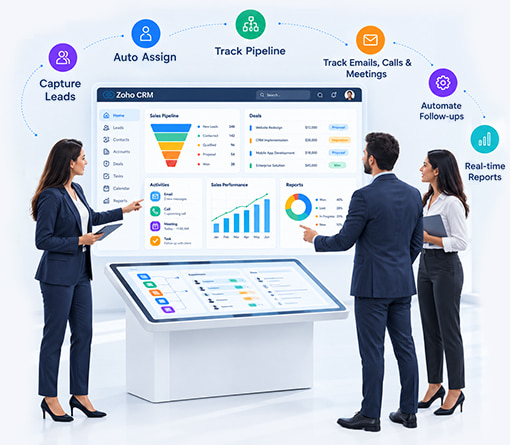
Zoho CRM connects your sales activities into one system:
An AI chatbot answers questions.

An AI agent goes further — it takes action inside your systems.

  • Leads are captured from forms, website, or manual entry
  • Automatically assigned to the right sales representative
  • Deals move through defined pipeline stages
  • Emails, calls, and meetings are tracked automatically
  • Follow-ups and tasks are triggered through automation
  • Reports update in real time for complete visibility
✦ Free · Authorised Zoho Partner

Is your Zoho CRM one of these? We can fix it.

Free CRM Assessment — 60 minutes, we audit your current setup and show you exactly what's misconfigured and what's possible.
— What We Configure

Six things we build into every Zoho CRM implementation

Not generic setup. Each element is configured to your specific sales process, your team, and your business rules — before a single rep opens the system.

🗺️

Sales Process Mapping & Pipeline Design

Before we touch a single configuration screen, we map your actual sales process — every stage, every trigger, every decision. Your pipeline stages reflect real milestones your deals pass through, not Zoho's default template. Stage probability, required fields per stage, and exit criteria all configured.

🏗️

Custom Modules & Field Configuration

Every business has information that doesn't fit in standard CRM fields. We build custom modules and fields for your specific data — product configurations, project types, compliance flags, industry-specific data — so your CRM captures what you actually need to know about each deal.

Workflow Automation & Lead Routing

Automated lead assignment based on territory, industry, or rep capacity. Follow-up sequences triggered by deal stage movement. Task creation when a deal stalls. Notification workflows keeping the right people informed. Everything that happens manually today — configured to happen automatically.

🔗

Email, Calendar & Third-Party Integration

Gmail or Outlook email sync — every sent email logged against the right deal automatically. Calendar integration — meetings appear in the CRM timeline. Website lead forms flowing directly into the pipeline. WhatsApp, telephony, and third-party tools connected via Zoho's integration layer or custom API.

📊

Dashboards & Sales Intelligence Reporting

Pipeline health dashboard showing deals by stage, value, and rep. Conversion rate reporting from lead to close. Revenue forecasting with configurable probability weighting. Activity tracking. Zoho Zia AI insights enabled and configured — so the CRM tells your team what to act on next.

🎓

Team Training & Adoption Programme

Task-based training — not a feature tour. We train your team on their actual workflows: "how to move a deal forward," "how to log a call," "how to read your pipeline dashboard." Admin training delivered separately. Aayushi available for post-launch support questions directly.


— Use Cases

Real Zoho CRM configurations — real outcomes

These are live implementations we've built for clients. Specific setups, specific results.

01

Full Zoho CRM Setup for a Professional Services Firm — Pipeline Built from Scratch

+

A UK professional services firm was tracking all deals in a spreadsheet. No pipeline visibility, no activity logging, no forecasting. We mapped their 6-stage sales process — from first contact to retainer signed — and built a custom Zoho CRM configuration around it. Custom fields for service type, engagement scope, and decision-maker mapping. Automated follow-up sequences triggered at each stage. Email and calendar integration so every client interaction was logged automatically.

💰Pipeline visibility on day 1 · 100% of client interactions logged automatically · forecast accuracy improved from gut-feel to 78% within 3 months
// What the setup looked like
Custom pipeline: Enquiry → Qualified → Scoped → Proposal Sent → Negotiation → Won/Lost. Each stage had required fields (budget confirmed, decision maker identified, etc.) before a deal could progress. Automated email sent when deal moved to Proposal Sent. Weekly pipeline report delivered to director every Monday at 8am.
Zoho CRMGmail SyncWorkflow EngineZoho Analytics
02

Zoho CRM Migration from Salesforce — Data Clean, Team Trained, Zero Downtime

+

A technology company was paying enterprise Salesforce licences for a 12-person sales team — more than half the functionality unused, and maintenance costs compounding. We managed the full migration to Zoho CRM: data audit and deduplication, field mapping, custom object re-creation, workflow recreation, and a two-week parallel run before full cutover. Zero data loss. Zero downtime. Team trained and operational on day one of go-live.

💰CRM cost reduced by 60% · same functionality · all historical data preserved · full team adopted within 2 weeks
// Migration approach
Phase 1: Salesforce data export, audit, deduplication (3,200 accounts, 8,400 contacts, 1,800 deals → cleaned to 2,800 / 7,100 / 1,650). Phase 2: Zoho CRM configured to match Salesforce pipeline stages and custom objects. Phase 3: Data import and validation. Phase 4: 2-week parallel run. Phase 5: Cutover on Monday morning.
Data MigrationDeduplicationZoho CRMCustom Objects
03

Lead Automation — Web Forms to CRM to Follow-Up Sequence in Under 90 Seconds

+

A B2B SaaS company had web forms feeding leads into a general email inbox — someone would periodically check the inbox, manually enter the lead into Zoho, and assign it to a rep. Leads were sitting uncontacted for hours. We built a fully automated lead intake and routing system: form submission → Zoho lead created instantly → enriched with company data → scored against their ICP → assigned to the right rep → personalised follow-up email sent. All in under 90 seconds, zero human touch for the routing.

💰Lead response time from 4+ hours to under 90 seconds · lead-to-demo conversion up 34% · zero leads falling through the gap
// The automation flow
Web form submitted → Zoho CRM lead created via Webhook → company data enriched via API → ICP score calculated (industry, company size, job title) → assigned to rep by territory/capacity → personalised email sent from rep's address → task created: "Call within 2 hours" → rep notified via Slack. Average: 87 seconds end-to-end.
Zoho CRMZoho FlowEnrichment APISlack Integration
04

Zoho CRM Audit & Rescue — Fixing a 3-Year-Old Implementation That Nobody Used

+

A manufacturing company had been paying for Zoho CRM for three years but the sales team was still doing everything in spreadsheets. The CRM had default Salesforce-style stages that meant nothing in their business, no email sync, no automation, and data from the original import that was never cleaned. We ran a full audit, identified the six root causes of non-adoption, rebuilt the configuration around their actual process, cleaned the data, and ran a structured re-adoption programme. Within 6 weeks, 100% of deals were tracked in the CRM.

💰From 0% CRM adoption to 100% within 6 weeks · existing Zoho licence cost finally justified · pipeline visibility achieved for the first time
// The 6 root causes found
1) Pipeline stages didn't match their business · 2) 40+ fields on the lead form (overwhelmed reps) · 3) No email sync (manual logging) · 4) No mobile app configured · 5) Data quality so poor reps didn't trust it · 6) No training — reps were shown the system once and left alone. All 6 fixed systematically.
CRM AuditData CleansingZoho CRMAdoption Programme
05

Zoho CRM + Zoho Desk Integration — Single Customer View Across Sales and Support

+

A SaaS company's sales team was closing deals without knowing the customer had 3 open support tickets. Their support team was handling complaints without knowing the customer was mid-renewal negotiation. We integrated Zoho CRM and Zoho Desk to create a single customer view — every support ticket visible in the CRM deal record, every contract detail visible to support agents. Sales and support finally speaking the same language about the same customer.

💰Zero upsells attempted to customers with open critical tickets · support team de-escalations improved with contract context · NPS scores up 12 points
// How it works
In Zoho CRM: every deal record shows open support tickets, CSAT score, and last interaction date. In Zoho Desk: every ticket shows customer's subscription plan, contract value, renewal date, and account owner. Escalation trigger: if a customer with >£20k ARR raises a critical ticket, CRM account owner is notified in Slack automatically.
Zoho CRMZoho DeskAPI IntegrationSlack Alerts
06

Zoho CRM AI Configuration — Zia Predictions, Scoring & Anomaly Alerts Enabled

+

Most Zoho CRM implementations leave Zia AI entirely unconfigured — it's available in every Zoho CRM Professional+ licence and almost nobody uses it. We configure Zia to work with your specific data: lead scoring trained on your historical win/loss patterns, deal anomaly detection flagging stalled or at-risk deals, email sentiment analysis alerting reps to negative signals, and best-time-to-contact predictions based on your customers' engagement patterns.

💰Reps focused on highest-probability deals · at-risk deals flagged 2 weeks before they'd previously been noticed · close rate up 18% in first quarter
// Zia features configured
Lead score model trained on 18 months of win/loss data — predicts conversion probability from first contact. Deal anomaly detection: flags deals with no activity in 10+ days. Sentiment analysis on inbound emails: negative tone triggers rep alert. Best time to contact: Zia learns each contact's email open patterns and suggests optimal send time.
Zoho Zia AILead ScoringAnomaly DetectionSentiment Analysis

— How Zoho CRM Works

Benefits of a Properly Configured Zoho CRM

An AI chatbot answers questions.

An AI agent goes further — it takes action inside your systems.

  • Clear visibility into your sales pipeline
  • Reduced manual work through automation
  • Improved follow-up consistency
  • Better forecasting and reporting accuracy
  • Higher team adoption due to ease of use

— Business Impact

What a properly implemented Zoho CRM delivers

Results clients typically see

100%
Team CRM adoption within 6 weeks — when configured around their actual workflow, not the default template
34%
Improvement in lead-to-demo conversion when lead automation is configured and response times drop below 4 minutes
60%
Cost reduction for companies migrating from Salesforce to Zoho at equivalent feature depth and team size
6wk
Typical time from discovery to fully live, trained, and adopted CRM — regardless of migration or fresh setup

Configured around your process — not Zoho's template

We spend the first week mapping how you actually sell before touching a single configuration screen. Your stages, your fields, your rules.

Sales team adoption — not just installation

We involve the sales team in design, train on real workflows, and measure adoption explicitly as a project success metric. A CRM nobody uses isn't a CRM.

Automation that eliminates the manual work your team resents

Lead routing, follow-up sequences, proposal reminders, activity logging — configured before go-live so manual work disappears on day one.

Aayushi — your named Zoho consultant, not a support ticket queue

Every client has a named Zoho consultant who knows their setup. Questions get answered by someone who built your system — not by a generic helpdesk.

Authorised Zoho Partner — with 23 years of engineering behind us

We're an Authorised Zoho Partner — but with a 23-year engineering company behind us. We can build custom integrations, APIs, and extensions that a pure Zoho reseller can't.

🔷
Infomaze is an Authorised Zoho Partner
We're recognised by Zoho for technical expertise and client delivery standards. This means we have direct access to Zoho's technical team, early access to new features, and the ability to provide official Zoho support and training to our clients.
— Engagement Models

Three ways to start — pick what fits your situation

NDA before day one, ISO 27001 certified, and honest advice on whether Zoho CRM is the right fit before any project is proposed.

✦ Zero commitment

Free CRM Assessment

No cost · No obligation
60 minutes · Remote or on-site
  • Audit your current Zoho setup (or your sales process if starting fresh)
  • Identify the 3 highest-impact configuration changes
  • Assess data quality and migration complexity
  • Recommend the right Zoho CRM tier for your team
  • Give you a realistic implementation timeline and scope
  • Written brief yours to keep — use it with any vendor
🔄 Ongoing

CRM Management Retainer

Monthly · Continuous development
Minimum 3 months · Scales with your needs
  • Named Zoho consultant on your CRM roadmap
  • New automation, modules, and integrations added monthly
  • Ongoing data quality monitoring and cleanup
  • Zia AI model retraining as your data grows
  • Priority support — questions answered same day
  • Monthly performance review of pipeline and automation
— How We Work

From assessment to fully adopted CRM in four steps

Every engagement starts by understanding your sales process — not by touching Zoho. We configure before we demo. We demo before we train. We train before we go live.

🗺️
01 —

Process Discovery

We map your actual sales process — stages, triggers, decision points, team structure. The CRM is designed around this map, not around Zoho defaults.

⚙️
02 —

Configure & Build

Pipeline, modules, fields, automation, integrations — all built and tested in a sandbox before touching your live environment. You review and approve.

🔄
03 —

Migrate & Parallel Run

Data migrated, cleaned, and validated. Two-week parallel run — old and new systems live simultaneously until the team has confidence in the new setup.

🎓
04 —

Train & Adopt

Task-based training for reps, admin training for managers. Adoption tracked as a KPI. Aayushi available for direct questions post-launch.

— Who This Is For

Three business situations where we deliver the fastest value

Sales Director — pipeline is invisible and reps aren't using the CRM

You have a Zoho CRM licence. Your team isn't using it. You're managing sales from email threads and spreadsheets and you have no reliable pipeline view. We fix the implementation so your team actually adopts it — and you get the visibility you've been missing.

CRM audit to find the 6 root causes of non-adoption
Reconfiguration around your actual sales process
100% team adoption target — measured explicitly

Operations / RevOps — scaling fast, manual processes becoming a bottleneck

You're growing and the manual parts of your sales process are becoming a ceiling. Lead routing, follow-ups, proposal reminders, activity logging — all happening by hand. You need the automation infrastructure to support 2× the current volume without 2× the headcount.

Full automation audit and build — end-to-end
Lead intake to follow-up sequence in under 90 seconds
Scalable architecture — grows with your volume

CFO / Founder — paying for Salesforce for a 15-person team

You're on a Salesforce contract that made sense at a different company stage. You're using 20% of the features and paying enterprise rates for a 15-person sales team. We manage the full migration to Zoho — your data, your pipeline, your automations — at a fraction of the cost.

Full Salesforce to Zoho migration managed end-to-end
Zero data loss · zero downtime · two-week parallel run
Typical 55–65% cost reduction at equivalent functionality

— FAQ

Questions we always get asked about Zoho CRM

How long does a full Zoho CRM implementation take?

+
A focused fresh implementation — pipeline configured, automation built, integrations connected, data migrated, and team trained — typically takes 4–8 weeks from the initial assessment to full go-live. Migrations from Salesforce or HubSpot with significant data volume typically run 6–10 weeks to include the data audit, deduplication, and parallel run period. We scope specifically after the free CRM Assessment — we never give generic timelines without understanding your specific situation.

We already have Zoho CRM — can you improve our existing setup?

+
Yes — and this is one of our most common engagements. We run a full audit of your current configuration, identify what's misconfigured or underutilised, and make targeted improvements. We don't rebuild everything from scratch unless the existing setup is fundamentally broken. In most cases, 6–8 specific changes to an existing Zoho CRM deliver 80% of the value that a full rebuild would. We'll tell you clearly which approach is right after the free assessment.

We're migrating from Salesforce — will we lose any data?

+
Not with our process. We start by running a full audit of your Salesforce data — identifying all objects, relationships, custom fields, and their Zoho equivalents. We then do a test migration in a sandbox environment, validate every record, and do a comparison between source and destination before any live migration begins. We run a parallel period with both systems live until you're confident in the Zoho data. Zero data loss is not an aspiration — it's a delivery criterion.

Do we need Zoho One or is just Zoho CRM enough?

+
It depends on what you need beyond CRM. Zoho CRM Professional is sufficient for most sales teams — pipeline management, automation, email integration, and Zia AI. If you also need HR (Zoho People), accounting (Zoho Books), support (Zoho Desk), or project management (Zoho Projects), Zoho One becomes more cost-effective than buying those individually. We'll recommend the right tier and suite after understanding your requirements — we don't upsell you into Zoho One if CRM alone will serve you.

What makes Infomaze different from other Zoho partners?

+
Three things. First, we're a 23-year engineering company — not just a CRM reseller. We can build custom integrations, APIs, and extensions that pure Zoho partners can't. Second, Aayushi — our Zoho lead — is named by clients in their reviews. She's not a generic consultant, she's someone who gets deeply involved in your implementation and stays available after go-live. Third, we're honest about when Zoho is and isn't the right fit. We've recommended HubSpot and Salesforce to clients when their situation genuinely called for it.

Can you integrate Zoho CRM with our existing ERP or finance system?

+
Yes — integrations are one of our core engineering capabilities. We've connected Zoho CRM to Sage, Xero, QuickBooks, SAP, Zoho Books, and custom-built ERP systems. The integration can be real-time (new deal closed → invoice created in ERP immediately) or scheduled sync. We design the integration architecture during the free assessment so you know exactly what data flows where before any development begins.
— Client Voices

What clients say about our Zoho implementations

★★★★★
"We've been working with Infomaze for six months on implementing Zoho People and CRM. Aayushi has been closely involved throughout — her support, responsiveness, and deep understanding of the platform have made the process smooth and effective. Infomaze has proven to be a reliable and knowledgeable Zoho partner."
G
Gaining Ground Investment Services
India · Zoho CRM + People Implementation
★★★★★
"Gaj and the team have completed projects across several of my businesses for many years now. The result is always outstanding. Communication always excellent, work very thorough and always completed on time. I really enjoy working with Infomaze and highly recommend them."
O
Overlander 4WD Hire
Australia · Multi-year Zoho client
★★★★★
"Quite possibly the best programming team on the planet. Went WAY above and beyond without charging more. Will HIGHLY recommend to anyone. The Zoho setup they delivered completely transformed how our team manages deals — visibility we never had before."
C
Chris
United States · Zoho CRM Setup
— Other Zoho Products We Implement
👥
Zoho People
HR, attendance, leave & performance
📚
Zoho Books
Accounting, invoicing & finance
🎧
Zoho Desk
Support with AI ticket routing
🔷
Zoho One
Full suite as one unified system

Ready to build a Zoho CRM your team actually uses?

Start with a free CRM Assessment. We audit your current situation, design the right configuration, and give you a realistic timeline and scope — before any commitment. Authorised Zoho Partner, ISO 27001 certified, 23 years of engineering behind every implementation.

See all Zoho services
— Related Resources
💼
Case Study: Gaining Ground
Zoho CRM + People implementation
🔄
Case Study: Loyalty Programme
Zoho Subscriptions integration
⚠️
Zoho People
6 implementation mistakes
🔷
Zoho Creator
Honest comparison from a Zoho partner
🏠
Zoho Business Systems
All Zoho services overview
Back to top
📊 BI Practice
Free Assessment
We find out why your dashboards aren't being used — and fix it.

🔒 ISO 27001 · No spam · Honest assessment