Free AI Readiness Assessment — we map your automation opportunities in 60 minutes, no obligation.
Case Study · Healthcare

Zoho One Replaces 4 Disconnected Systems for a Multi-Location Healthcare Group.

A healthcare group running five clinics was booking patients in one tool, billing in another, tracking staff attendance on paper, and fielding support requests over email. We consolidated all of it into a single Zoho One workspace - rolled out clinic by clinic, with zero appointment downtime.

4→1Systems consolidated into Zoho One
58%Faster front-desk patient onboarding
5 clinicsMigrated over 6 weeks, no downtime

Client

Multi-location healthcare group (name withheld under NDA)

Industry

Healthcare

Service

Zoho One Implementation & Data Migration

Tools

Zoho CRM · Zoho Books · Zoho People · Zoho Desk · Zoho Analytics · Deluge

Complexity

★★★★☆

Locations

5 clinics, 1 admin office

Pathbreaking approach

Five clinics, four disconnected tools, zero shared patient record. We didn't migrate everything at once - we proved the workspace at one clinic before touching the rest.

— The Challenge

Four systems. Five clinics. No shared view of a single patient.

The client runs five outpatient clinics under one brand, with a small central admin office handling billing and HR for all of them. By the time we got involved, the front-desk teams were booking appointments in a basic CRM that had never been configured past its default fields, the admin office was reconciling invoices in a separate accounting tool that didn't talk to the CRM at all, staff attendance and leave requests were tracked on paper timesheets faxed or scanned in weekly, and patient support questions came in over a shared email inbox with no ticketing or history.

None of the four systems shared a record. A patient who called the admin office about a billing question couldn't be looked up against their appointment history without a phone call to the clinic that had seen them. During flu season, when call volume across all five clinics climbed past what the admin team could triage from a shared inbox, requests started sitting unanswered for two and three days at a time.

// The constraints

  • Patient and billing records lived in four separate systems with no common identifier between them, so reconciling a single patient's history meant manual cross-checking
  • Five active clinics meant zero tolerance for scheduling downtime during any part of the migration - a missed sync could mean a missed appointment
  • Front-desk staff at each clinic had no dedicated IT support and needed a system simple enough to run without a long training period
  • Sensitive patient and billing data required strict access controls by role and by clinic, not a single shared login for every user
  • The admin office wanted one place to see staffing, billing, and support load across all five clinics - something none of the four existing tools could show

The instinct in this situation is often to look at each problem separately - a better booking tool here, a proper accounting package there, an HR system somewhere else. That approach usually just adds a fifth and sixth disconnected tool to the pile. The actual problem wasn't any single system; it was that scheduling, billing, staffing, and support had never been designed to share information in the first place.

So instead of patching each gap individually, we scoped a full Zoho One implementation - one workspace covering CRM, Books, People, Desk, and Analytics, configured around how the clinics actually operate rather than a generic template.

— The Solution

One workspace, rolled out clinic by clinic, with a data migration layer underneath.

We split the project into a data and access layer and a day-to-day operating layer, so each clinic could be brought onto the new system on its own timeline instead of one all-at-once cutover across all five locations.
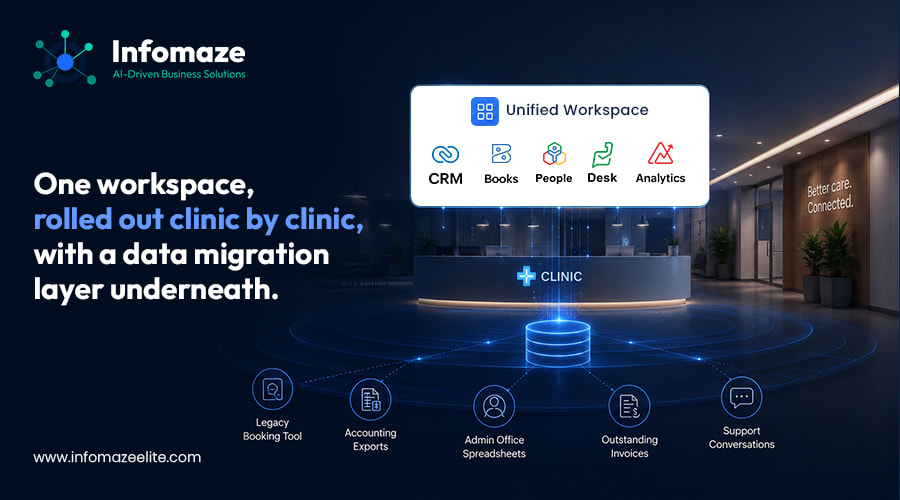
Unified Zoho One Data Model Across Clinics

Layer 1 - Data Migration & Access Model

  1. Built a unified patient and account record in Zoho CRM, matched and de-duplicated against the old booking tool, the accounting exports, and the admin office's spreadsheets
  2. Migrated the chart of accounts and outstanding invoices into Zoho Books, linked to the same patient record used in CRM so billing and appointment history sit side by side
  3. Set up Zoho People with role-based access per clinic, moving staff attendance, leave requests, and shift schedules off paper timesheets
  4. Configured Zoho Desk with a shared inbox routing rules by clinic and query type, replacing the single unstructured support email address
  5. Built role- and clinic-based permission sets across all five apps, so front-desk staff at one clinic can't see another clinic's patient list, while the admin office has visibility across all of them

Layer 2 - The Zoho One Workspace

  1. A single login gives each clinic's front desk one screen for booking, patient lookup, and billing status instead of switching between four tools
  2. Custom Deluge workflows connect appointment check-in in CRM directly to invoice generation in Books, removing the manual step of re-entering visit details for billing
  3. A Zoho Analytics dashboard gives the admin office a live view of appointment volume, outstanding invoices, staffing levels, and open support tickets across all five clinics on one screen
  4. Automated reminders and follow-ups replace the manual call-backs the admin team used to make for unpaid invoices and missed appointments
📊 Unified Zoho One data model - one patient/account record shared across CRM, Books, People, and Desk. Role- and clinic-scoped access. Feeds a single Analytics dashboard for the admin office. No clinic's day-to-day workflow was disrupted during rollout - each one moved over on its own schedule.

We rolled the CRM and Books migration out first at a single pilot clinic, running it alongside their existing tools for two weeks to confirm every patient and billing record matched before switching that clinic over fully. Only once the pilot clinic's numbers were provably correct did we extend the rollout to the remaining four, migrating one clinic roughly every ten days rather than attempting all five in a single weekend.

— Why It Worked

The insight that made the difference

Most multi-location healthcare businesses assume a Zoho One rollout has to happen all at once - every clinic, every module, live on the same day. That's the riskiest possible version of this project, because it means five locations of untested new workflows going live simultaneously, with no way to isolate a problem to one site if something goes wrong.

The insight that shaped this project was treating each clinic as its own rollout, not a single five-way cutover. Once the pilot clinic's data was validated and the front-desk staff there were comfortable with the new workspace, extending it to the next clinic was a repeatable, low-risk step rather than a fresh unknown. That turned a single high-stakes migration into five small, provable ones.

✦ The Replicable Lesson

A multi-location Zoho One rollout should move location by location, not all at once. This pattern applies to any business running the same operations across several sites with no shared system between them - validating the data and the workflow at one location first, then repeating it, is almost always lower-risk than a single simultaneous cutover, even though it takes a little longer end to end.

The Replicable Lesson

The value of a referral program isn't the commission rate - it's whether the referring partner can send a client and genuinely stop thinking about it. Advisors, consultants, and fractional executives refer repeatedly only when the first referral costs them nothing in reputation or ongoing effort. Get the handoff right once, and the second and third referrals happen without anyone asking for them.

— Results

What was delivered

4→1Systems consolidated into a single Zoho One workspace
58%Reduction in front-desk patient onboarding time
6 weeksFull rollout across all 5 clinics

Beyond the headline numbers, the admin office went from manually calling each clinic for a staffing or billing snapshot to pulling it from one Analytics dashboard in under a minute. Support tickets that used to sit in a shared inbox for two to three days during busy weeks are now routed and answered same-day, because Zoho Desk shows the requester's appointment and billing context automatically instead of requiring a manual lookup.

The clinic staff mentioned one change most often when asked what actually shifted day to day: new front-desk hires, who previously needed close to two weeks shadowing a colleague across four separate logins, are now productive on the single Zoho One workspace within two or three days.

🗓️Unified Scheduling & Billing
Appointment check-in flows straight into invoicing - no manual re-entry between systems.
👥Staffing Visibility
Attendance, leave, and shift coverage across all five clinics on one Zoho People view.
📊Admin Analytics Dashboard
Appointments, invoices, staffing, and support load - one screen for the whole group.

Running clinics, offices, or branches on tools that don't talk to each other?

As a certified Zoho Authorized Partner, we build the Zoho One workspace that connects scheduling, billing, HR, and support - rolled out one location at a time, without disrupting the ones already running.

— Frequently Asked Questions

Zoho One for Multi-Location Businesses - FAQs

What is Zoho One and how is it different from using individual Zoho apps?

Zoho One is Zoho's bundled suite covering CRM, Books, People, Desk, Analytics, and 40+ other applications under a single license and login. The difference from using individual Zoho apps separately is that Zoho One is built to share data across every app by default, so a record created in CRM is visible to Books, People, and Desk without a separate integration project.

How long does a Zoho One implementation take for a multi-location business?

For a business with multiple locations, we typically validate the workspace at one location first (two to three weeks including data migration and staff sign-off), then extend it to remaining locations roughly every one to two weeks. A five-location rollout in this pattern usually completes in six to ten weeks depending on data volume and customization scope.

Can Zoho One restrict what staff at one location can see about another location?

Yes. Zoho One supports role- and territory-based access controls across its apps, so permissions can be scoped by location, department, or role - a front-desk user at one site does not need to see another site's patient, billing, or staffing records unless explicitly granted access.

Does moving to Zoho One mean migrating years of existing records?

Usually, yes, and it's the part of the project that needs the most care. A Zoho Authorized Partner will map your existing data (from spreadsheets, legacy CRMs, or accounting tools) against Zoho's data model, de-duplicate overlapping records, and validate the migrated data against the source before any team starts using the new system day to day.

Why hire a Zoho Authorized Partner instead of setting up Zoho One directly?

Zoho One is flexible enough to be configured many different ways, and most of the risk in a multi-location rollout is in the migration and workflow design, not the software itself. A certified Zoho Authorized Partner brings implementation patterns from prior multi-location projects, which typically means fewer data errors during migration and a faster, staged go-live.

Back to top
📊 BI Practice
Free Assessment
We find out why your dashboards aren't being used — and fix it.

🔒 ISO 27001 · No spam · Honest assessment