Free AI Readiness Assessment — we map your automation opportunities in 60 minutes, no obligation.
📊 BI & Data Practice
Free BI Dashboard Consultation
We map your data sources, existing tools, and reporting requirements — and recommend the right approach before any commitment.

🔒 ISO 27001 · NDA before any data shared · No spam

Dashboards & Visualisation

📊 BI & Data

Your Data Exists.
Your Decisions Shouldn't
Wait for a Report.

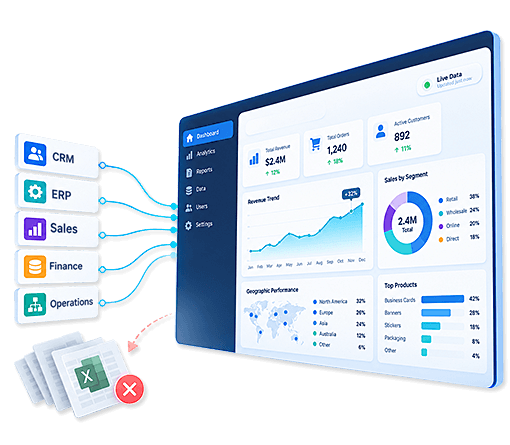
We build executive and departmental dashboards in Power BI, Tableau, Qlik, and Zoho Analytics — connecting your data sources into live intelligence. Including our flagship project for Atlantic LNG, where we created a complete executive BI platform without a single direct database connection.

EXECUTIVE DASHBOARD · POWER BI · LIVE
● 6 sources connected
REVENUE MTD
$4.2M
↑ 11% vs target
MARGIN
38.4%
↑ 2.1pp MoM
ANOMALIES
3
Flagged today
DEPARTMENT DASHBOARDS — LIVE
Executive — Revenue, Margin, KPIs, Board Pack
Live
Sales — Pipeline, Conversion, Rep Performance
Live
Operations — Production, Capacity, Downtime
Live
Finance — P&L, Cash Flow, Budget vs Actual
Refreshing
DATA SOURCES CONNECTED
ERP system — SQL Server · auto-refresh 4h
CRM — Zoho + Salesforce data unified
Finance — QuickBooks + Excel models
TOOL-AGNOSTIC — WE RECOMMEND WHAT'S RIGHT Power BI · Tableau · Qlik · Zoho Analytics. We assess your data, team, and budget — then recommend the tool that fits, not the one we prefer to sell.
Atlantic
LNG — executive BI platform built without direct database access. Multi-source, multi-department.
4
BI tools — Power BI, Tableau, Qlik, Zoho Analytics. We recommend the right one, not the same one every time.
Live
Active Tableau project in progress — alongside historical deployments in Power BI and Qlik
Multi
Industry — oil & gas, F&B, print MIS, CRM platforms, professional services
— Our BI Tools

Four Platforms. We Recommend the Right One for your Situation.

We don't lead with one tool. We assess your data environment, existing licences, team capability, and budget — and recommend whichever platform actually fits. We've delivered in all four.

Microsoft Power BI

● Primary tool · Most projects delivered
Deep Microsoft 365 integration
Cost-effective for mid-market
Strong self-service capability
PowerApps data collection layer
Atlantic LNG & restaurant chain

Tableau

● Active project in progress · Historical deployments
Best-in-class visualisation depth
Complex analytical requirements
Large dataset performance
Salesforce ecosystem fit
Current client engagement live

Qlik

● Multiple deployments — QlikView & QlikSense
Associative data model
Complex multi-source environments
Strong ETL and data prep
QlikView and QlikSense experience
Enterprise deployments

Zoho Analytics

● Authorised Zoho Partner · Native integration
Native Zoho product connections
Best for Zoho-first businesses
PrintPlanr & CRM clients
Lower total cost for Zoho stack
Zia NLP query layer

— The Problem

Six Dashboard Challenges we Solve

Disconnected data, manual reports, dashboards nobody uses — these are the problems we find in every BI engagement.

🗄️

Data trapped in multiple disconnected systems

ERP in one system, CRM in another, finance in spreadsheets, operations in a third database. No unified view. The Atlantic LNG challenge — data spread across multiple systems with no direct connection possible — is the extreme version of what most businesses face in some form.

📋

Reports built manually every week by someone senior

The CFO's Monday report takes three hours to assemble on Friday. A senior analyst pulling data from multiple sources, formatting in Excel, emailing a static file. Decisions made from data that's already several days old by the time it reaches the meeting.

📊

Dashboards that were built but nobody uses

A Power BI environment was set up two years ago. Six dashboards were created. Three people use it occasionally. The rest of the business still relies on email attachments. The problem is almost never the tool — it's that the dashboards weren't designed around how decisions actually get made.

🔢

Different departments showing different numbers

Finance says revenue is $4.2M. Sales says pipeline converted to $4.4M. Operations says output corresponds to $3.9M. Three departments, three numbers, no canonical definition. Every executive meeting starts with 20 minutes arguing about whose number is right.

⚙️

Wrong BI tool chosen for the environment

A business chose Tableau when Power BI would have been half the price and better integrated with their Microsoft stack. Or chose Power BI when their data complexity required Qlik's associative model. Tool selection matters before implementation begins — and most businesses choose based on the vendor's sales pitch, not an honest assessment.

👁️

Executives can't see the business in one view

Revenue visible in the CRM. Margins in the accounting system. Production KPIs in operations. Three systems, three logins, no single executive view. Leadership making decisions from partial pictures because nobody has built the layer that brings it all together.


✦ Free · No Commitment
Not Sure Which BI Tool is Right, or How to Connect your Data Sources?
Free consultation — we map your data environment and recommend the right tool and approach before any project begins.
— What We Build

Six Things we Configure in Every BI Dashboard Engagement

Data architecture first. Dashboard design second. Adoption tracked as a deliverable.

🗄️

Data Source Connectivity & Architecture

Before building a single dashboard, we map and connect your data sources — SQL databases, ERP systems, CRMs, Excel files, APIs, cloud platforms. Where direct database connection isn't possible (as with Atlantic LNG), we design alternative ingestion approaches using PowerApps, Excel staging layers, or API connectors to get the data into the BI layer without compromising the source system.

📐

Data Model & Canonical Metric Definition

Revenue means the same thing everywhere. Margin is calculated consistently across all departments. Before dashboards are designed, we work with finance and operations leadership to define every key metric — so the numbers are always the same regardless of which dashboard you're looking at. This is the step most BI projects skip and regret.

🏢

Executive Dashboards

C-suite and board-level dashboards showing the full business picture — revenue, margin, pipeline, headcount, operational KPIs — in one view updated on schedule. Designed for decision-making, not data display. Every metric on an executive dashboard should drive a decision — metrics that don't are noise. Board pack data assembled automatically from the same model.

🏬

Departmental Dashboards

Dashboards for each operational audience — sales (pipeline, conversion, rep performance), finance (P&L, cash, budget vs actual), operations (production, capacity, efficiency, raw materials), HR (headcount, leave, performance). Each department sees their data in the format that drives their specific decisions — with access controls ensuring they see only what's appropriate.

🔔

Alerts, Anomaly Detection & Scheduled Delivery

Dashboards that push intelligence rather than waiting to be visited. Threshold alerts fire when KPIs breach configured limits. Anomaly detection flags statistical deviations from baseline. Weekly and monthly reports assembled from live data and delivered by email on schedule — the management report arrives before the meeting, not the day after.

🎓

Training, Adoption & Self-Service Capability

A BI implementation is only valuable if people use it. We design dashboards with end users involved — not just stakeholders. Training delivered for both consumers (how to read and act on dashboards) and power users (how to build their own reports in the self-service layer). Adoption tracked as a project KPI at 30, 60, and 90 days post-launch.


— Use Cases

Real BI Dashboard Projects — from Oil & Gas to Restaurants

Each engagement brought a different data challenge. The Atlantic LNG project is our most distinctive — a complete executive BI platform built without a single direct database connection.

01

Atlantic LNG — Executive & Departmental BI Platform Without Direct Database Access

+

Atlantic LNG is a liquefied natural gas company with operational and financial data spread across multiple systems — different databases, different platforms, different ownership. Direct database access was either technically constrained or operationally restricted. The challenge: build a complete executive dashboard and departmental BI layer from data that couldn't be connected in the conventional way. The solution was pathbreaking — we used Microsoft PowerApps as a structured data collection layer alongside managed Excel data exports, feeding everything into Power BI without touching a single production database.

💰Complete executive BI platform delivered · Multiple departments with live dashboards · Zero direct database connections required · Production systems entirely unaffected
// The pathbreaking data ingestion approach
The challenge: operational data across multiple databases with no direct Power BI connectivity granted. The solution — two ingestion streams: Stream 1: department data owners export structured Excel files to a defined staging location on a defined schedule. Power BI reads from staging — not from the live database. Stream 2: for data that needed to be captured and entered (not just exported), we built Microsoft PowerApps forms. Operations staff enter data through the PowerApp. PowerApps writes to a structured SharePoint/Dataverse table. Power BI reads from that table. Result: complete, current data in the BI layer without a single connection to a production database system.
// The constraints
  • Multiple databases — different platforms, different teams
  • No direct database connectivity permitted to production
  • Data spread across operational and financial systems
  • Some data had no digital source — manual processes
// Our solution
  • Excel staging layer — structured exports from each system
  • PowerApps for data that needed to be captured digitally
  • Power BI reads from staging and PowerApps — not production
  • Executive + departmental dashboards from unified data model
Microsoft Power BIMicrosoft PowerAppsExcel Staging LayerSharePoint / Dataverse
02

Restaurant Chain — Executive, Sales, Production & Churn Dashboards in Power BI (NDA)

+

A restaurant chain — country and company name under NDA — needed a comprehensive BI layer covering every dimension of the business: executive P&L and KPI overview, sales performance by location and period, customer churn analysis, production and kitchen operations metrics, and raw materials usage and waste. Each audience had fundamentally different data requirements and a different way of making decisions from that data. We built the full multi-audience Power BI environment with a shared canonical data model underneath.

💰5 audience-specific dashboards from one data model · Churn analysis identifying at-risk customer segments · Raw materials waste visibility reducing procurement cost · Executive P&L always current without manual assembly
// The five dashboard audiences
Executive: Revenue by location, total margin, top-line KPIs, trend vs target, board pack auto-generation. Sales: Sales by location, day-part performance, average transaction value, repeat customer rate, promotional effectiveness. Customer/Churn: Customer return frequency, at-risk segment identification, lifetime value by acquisition channel, churn rate by location and demographic. Production/Kitchen: Orders by station, preparation time, waste by ingredient category, kitchen efficiency score. Raw Materials: Usage by ingredient vs menu mix, supplier performance, waste percentage, procurement forecast from current usage rates.
Microsoft Power BIPOS IntegrationChurn AnalysisMulti-Location BI
03

PrintPlanr & CRM Platforms — Power BI and Zoho Analytics for SaaS Product Intelligence

+

For the PrintPlanr print MIS platform and associated CRM solutions, we delivered BI analytics across both Power BI and Zoho Analytics — depending on where the client's data lived and what their existing tool stack looked like. Clients deeply embedded in the Microsoft ecosystem used Power BI. Clients already on Zoho products used Zoho Analytics with native connectors. The underlying data modelling approach was consistent — what changed was the visualisation layer used to surface it.

💰Right tool for each client's stack — not one-size-fits-all · Native connectors reducing integration complexity · Consistent data model regardless of BI platform chosen
// Tool selection based on client stack
Microsoft-centric clients: Power BI with Direct Query to SQL databases, M-language transformations, DAX measures for KPI calculations, Power BI Service for sharing and scheduled refresh. Zoho-centric clients: Zoho Analytics with native CRM and Books connectors, Zia NLP query layer for non-technical users, automated reports delivered to leadership on schedule. Both approaches: same canonical metric definitions, same dashboard structure and audience segmentation, different rendering layer. Client gets the same intelligence whether they're on Power BI or Zoho Analytics.
Microsoft Power BIZoho AnalyticsDAXZoho CRM Integration
04

Tableau Deployment — Complex Analytical Requirements Where Visualisation Depth Matters

+

We have delivered Tableau implementations in the past and have an active Tableau project currently in progress. Tableau is the right choice when visualisation depth and analytical complexity matters more than cost-efficiency — complex calculated fields, nested table calculations, advanced geographic mapping, or large dataset performance where Tableau's in-memory engine outperforms alternatives. We also recommend Tableau for clients already in the Salesforce ecosystem where Tableau CRM (Einstein Analytics) integrates naturally.

💰Current active engagement · Previous deployments in production · Recommended when visualisation complexity or Salesforce integration makes it the right fit
// When we recommend Tableau over Power BI
We recommend Tableau when: (1) The client's primary CRM is Salesforce — Tableau CRM integrates natively and licensing is often bundled. (2) The analytical requirements are highly complex — nested calculations, advanced statistical overlays, custom geographic layers that go beyond what Power BI handles cleanly. (3) The client has large datasets where Tableau's in-memory engine provides better performance. (4) The design team has strong Tableau skills already. We don't recommend Tableau for Microsoft-centric businesses or mid-market clients for whom the licensing cost doesn't match the complexity requirement.
Tableau DesktopTableau ServerTableau CRMSalesforce Integration
— Our Approach

How we think about BI architecture — four layers

A dashboard is the visible layer. The three layers underneath it determine whether the numbers are right, current, and trustworthy.

Data Sources
SQL / MySQL ERP systems CRM (Zoho, Salesforce) Excel / CSV REST APIs PowerApps forms Cloud platforms
Ingestion & Staging
Direct Query connections Scheduled imports Excel staging (no-DB approach) PowerApps data capture Dataverse / SharePoint
Data Model
Canonical metric definitions DAX / calculated measures Row-level security Relationship mapping Agreed definitions per audience
Visualisation
Power BI dashboards Tableau workbooks Qlik apps Zoho Analytics reports Scheduled delivery Anomaly alerts

— Business Impact

What a properly implemented BI platform delivers

Results clients typically see

0
Manual report assembly — every dashboard and report auto-refreshed and delivered on schedule
Single
Source of truth — one canonical number for every metric, agreed across all departments before dashboards are built
Atlantic
LNG — full executive BI platform without direct database access. A blueprint for constrained-connectivity environments.
4
BI tools in our active practice — we recommend what fits your environment, not what we prefer to deliver

Tool-agnostic recommendation — always

We've delivered in Power BI, Tableau, Qlik, and Zoho Analytics. When you ask us which tool to use, we give you an honest answer based on your environment — not based on which tool we're currently selling.

The Atlantic LNG approach — when direct access isn't possible

Our PowerApps + Excel staging layer approach for Atlantic LNG proved you don't need direct database connectivity to build a complete BI platform. If your environment has similar constraints, we've already solved this problem.

Data model before dashboards — every time

We spend time on canonical metric definitions before building a single visualisation. This is the work most BI projects skip. It's also the reason most BI projects produce numbers that nobody trusts.

Adoption tracked as a deliverable

Dashboard usage measured at 30, 60, and 90 days. If adoption is low, we investigate why and fix it — whether that's training, redesign, or addressing underlying data quality issues.

— Engagement Models

Three ways to start

ISO 27001. NDA before any data is shared. We audit your data sources before recommending a tool or approach.

✦ Zero commitment

Free BI Assessment

No cost · No obligation
60–90 minutes · Remote
  • Map your data sources and connectivity constraints
  • Identify the right BI tool for your environment
  • Design the data architecture approach
  • Assess existing dashboards if any exist
  • Written recommendation yours to keep
🔄 Ongoing

BI Retainer

Monthly · Continuous development
Min. 3 months · Scales with your data
  • Named BI consultant on your analytics roadmap
  • New dashboards and data sources monthly
  • Data model maintenance as business evolves
  • Priority support — same-day response
  • Monthly adoption and performance review
— How We Work

From data audit to live dashboards in four steps

Data model agreed first. Tool selected second. Dashboards built third. Adoption measured last.

🔍
01 —

Data Audit

We map all data sources, assess connectivity, identify quality issues, and define canonical metric definitions with your leadership team.

🏗️
02 —

Architecture & Tool Selection

Data architecture designed. BI tool selected based on your environment — not our preference. Ingestion approach agreed (direct query, staging, or PowerApps where needed).

📊
03 —

Build & Validate

Dashboards built in staging. Numbers validated against source systems by your team. Every metric agreed before go-live. Alerts and scheduled delivery configured.

📈
04 —

Train & Measure Adoption

Consumer and power user training delivered. Dashboard usage tracked at 30, 60, and 90 days. Low adoption investigated and fixed.

— Who This Is For

Three situations where we deliver fastest

CEO / MD — making decisions from last week's data

Your business intelligence arrives in a weekly email with a static attachment. By the time you act on it, the situation has moved on. A live executive dashboard means you're always looking at current data — not last week's picture.

Single executive dashboard — full business picture
Live data — updated on schedule automatically
Board pack assembled automatically from the same model

Head of Operations — data in too many disconnected systems

Your operational data sits across an ERP, a CRM, spreadsheets, and production systems with no unified view. Even without direct database access — as with Atlantic LNG — we can build a complete intelligence layer from your data.

Multi-source data connected or staged correctly
PowerApps input layer if direct DB access isn't possible
Operational KPIs — production, capacity, efficiency

Finance Director — manual reporting consuming the team

Monthly close requires three days of manual data assembly. Ad hoc data requests take two days each. Automated BI replaces the manual assembly — finance reviews and approves rather than builds from scratch.

Management accounts assembled from live data automatically
Budget vs actual always current — no manual reconciliation
Ad hoc queries answered in seconds via NLP or self-service

— FAQ

Questions we always get about BI dashboards

How did you build dashboards for Atlantic LNG without database access?

+
Atlantic LNG had data in multiple systems across different technical environments — direct Power BI connectivity to production databases was either technically constrained or not approved. Our solution used two parallel ingestion approaches. First: structured Excel exports — each system's data owner exports data to a defined format on a defined schedule, which Power BI reads from a staging location rather than the production database. Second: for data that didn't have an export capability or needed to be actively captured, we built Microsoft PowerApps forms. Operational staff enter data through a PowerApp, which writes to SharePoint or Dataverse, which Power BI reads. The result was a complete, current BI platform that never touched a production database. This approach is replicable for any client with similar connectivity constraints.

How do you choose between Power BI, Tableau, Qlik, and Zoho Analytics?

+
We assess four factors: (1) Your existing technology stack — Microsoft 365 businesses usually benefit most from Power BI. Salesforce businesses should consider Tableau CRM. Zoho businesses get the best integration from Zoho Analytics. (2) Analytical complexity — Tableau handles very complex visualisation requirements better than Power BI. Qlik's associative model handles complex multi-source analysis exceptionally well. (3) Budget — Power BI is typically the most cost-effective for mid-market businesses. Tableau and Qlik Enterprise carry higher licensing costs that are only justified by the specific capability requirements. (4) Your team's existing skills — where capability already exists, we build on it rather than introducing something new. We give you an honest recommendation in the free assessment.

What is a canonical data model and why does it matter?

+
A canonical data model means agreeing on one definition for every metric before building any dashboard. Revenue: is it when the invoice is raised or when payment is received? Pipeline: does it include all active deals or only those above a probability threshold? Margin: gross or net? Before we build a single dashboard, we work with finance, sales, and operations leadership to define every key metric in writing. These definitions are then implemented in the data model and applied consistently to every dashboard. Without this step, different dashboards show different numbers for the same metric — and every meeting starts with 20 minutes of arguing about whose number is right.

How long does a BI dashboard implementation take?

+
A focused engagement — connecting 3-4 data sources, building an executive dashboard and 2-3 departmental dashboards — typically takes 6–10 weeks from data audit to live deployment. Complex multi-source environments with data quality issues can take longer — the Atlantic LNG engagement was extended precisely because the data ingestion architecture required careful design and validation. We scope specifically after the free assessment. We don't give timelines without understanding your data environment — anything quoted before that conversation is guesswork.
— Client Voices

What clients say about our work

★★★★★
"Gaj and the team have completed projects across several of my businesses for many years. The result is always outstanding. Communication always excellent, work very thorough and always completed on time. I really enjoy working with Infomaze and highly recommend them."
O
Overlander 4WD Hire
Australia · Long-term client
★★★★★
"Quite possibly the best programming team on the planet. Went WAY above and beyond without charging more. Will HIGHLY recommend to anyone. The BI dashboards gave our leadership team visibility they had never had before."
C
Chris
United States
★★★★★
"We've been working with Infomaze for six months on implementing Zoho People and CRM. Aayushi has been closely involved throughout — her support, responsiveness, and deep understanding of the platform have made the process smooth and effective."
G
Gaining Ground Investment Services
India · Zoho Implementation

Ready for Dashboards that Tell you What's Happening Right Now?

Start with a free BI assessment. We map your data sources, recommend the right tool for your environment, and design the architecture — before any commitment. ISO 27001 certified, 23 years of engineering, active projects in Power BI, Tableau, and Zoho Analytics.

See all BI services
🔮
Predictive Analytics
ML models on your data
🗄️
Data Warehouse & ETL
Single source of truth
📋
Automated Reporting
AI-generated summaries
📊
Zoho Analytics
BI within Zoho One
🏠
BI & Data Overview
All BI services
📊 BI Practice
Free Assessment
We find out why your dashboards aren't being used — and fix it.

🔒 ISO 27001 · No spam · Honest assessment