Free AI Readiness Assessment — we map your automation opportunities in 60 minutes, no obligation.
⚛️ .NET MODERNISATION 🏥 FINANCE PORTAL 🇺🇸 United Kingdom
Clients served — 7-Eleven Walmart + Goodwill Network & others

Migrating a Legacy .NET 4.5 Finance Portal to
.NET 8 — No Downtime

How Infomaze moved a 10-year-old wealth management portal off .NET Framework 4.5 while 300 advisers and 4,200 clients kept using it every day.

REACT NATIVE · HEALTHCARE APP DASHBOARD
● Live
BUILD TIMELINE
4 Wks
Concept to both app stores
RECEPTION CALL DROP
34%
First month post-launch
APP STORE APPROVAL
Day 29
Apple — 3 days ahead of buffer
FEATURES SHIPPED IN V1
Patient Login & Secure Session Management
Live
Appointment Booking — Browse, Select, Confirm
Live
Push Notifications — Confirmations & 24hr Reminders
Live
DELIVERY MILESTONE TRACKER
Backend API & Authentication — Week 1
✓ Done
Core Screens & Booking Flow — Week 2
✓ Done
Video Consultations & Prescription Requests — v2
Q3 2025
📊
MANAGEMENT INSIGHT Routine appointment bookings moved fully to mobile within the first month — reception call volume dropped 34%. Slot-locking logic eliminated double-booking at the confirmation step. Both iOS and Android approved within 3 days of submission.
14 wks
Full migration duration
0hrs
Downtime during migration
68%
Faster average page load
0 gaps
FCA audit trail throughout
— THE PROBLEM

A portal running the business — built on a framework Microsoft stopped investing in.

Meridian Wealth Management had been running their client portal on .NET Framework 4.5 since 2013. For most of that decade it had worked well enough. It handled client portfolio views, document storage, adviser notes, scheduled reporting, and the FCA compliance audit trail. When it was originally built, it was solid engineering.

By 2024 the cracks were showing. Page response times had crept up as the client base grew past 4,000. Third-party financial data providers had stopped publishing .NET Framework SDKs — their integrations now existed only in .NET Core packages the portal couldn't use. The developer who had maintained the system for five years had moved on, and finding contractors willing to work in the old codebase had become genuinely difficult.

Their CTO, Stuart Ramsay, had wanted to migrate for two years. Every UK agency he'd spoken to had proposed the same approach: build a new portal in parallel, run both systems for a while, then cut over in a planned maintenance window. Stuart had seen that approach go badly at a previous employer. A cutover migration means two systems in sync, a high-pressure launch night, and a rollback that's never as clean as the planning assumes.

⚠️

The cutover problem nobody talks about

Parallel rebuild means two live systems. As the old system keeps taking real data, you have a synchronisation problem. The longer the parallel period runs, the more complex the final cutover becomes. And if something breaks on launch night, rolling back means losing everything written to the new system during the cutover window.

🔒

FCA compliance made it harder

The portal generated regulatory compliance reports and held a complete client interaction audit trail. A gap in audit records — even a short one during a maintenance window — creates a regulatory problem. The FCA doesn't accept 'we were migrating' as an explanation for missing records.


“I'd seen a cutover migration done badly before. I wasn't doing that again. If someone couldn't migrate it without taking it offline, I wasn't interested.”
— CTO, Meridian Wealth Management
— Our Approach

Incremental migration. Module by module. The old system retires gradually.

We proposed the strangler fig pattern applied to a .NET Framework monolith. Rather than building a parallel system and cutting over, we would migrate the portal module by module while the existing system stayed live. At every point during the 14-week project, the portal was running a mix of old and new code. Users noticed nothing different. When the last module migrated, the legacy server was retired.

The pattern works by placing a routing layer in front of the existing application. New and migrated modules are served by the .NET 8 application. Everything else still routes to the legacy .NET Framework server. The legacy side handles less and less as the migration progresses, until it handles nothing.

Strangler Fig Migration Strategy
// The routing layer — how it worked in practice

All requests → Nginx reverse proxy (deployed week 1)

if module in migrated_modules:
    route → .NET 8 Azure App Service
else:
    route → Legacy .NET 4.5 IIS Server

Week 0:  migrated_modules = []

Week 4:  migrated_modules = [
    'auth',
    'session'
]

Week 7:  migrated_modules = [
    'auth',
    'session',
    'portfolio_view',
    'client_data'
]

Week 14: migrated_modules = ['all']

// Legacy IIS retired

— Six modules. One coherent product. Eight months.

We told them their data was messy. They didn't love hearing it.

The first thing we do on any data project is spend time with the actual data before agreeing to a scope. In this case, that meant two days on-site in the West Midlands — one day with the production team, one day with finance.

SAP Business One had solid transaction data going back several years. But the way it was being used meant that several key fields were inconsistently populated. Some production orders had completion timestamps. Some didn't. The quality tracking sheet, maintained on a shared drive, had been through three different formats in four years and had columns that meant different things depending on when the row was entered.

We came back with an honest assessment: a clean Power BI dashboard was achievable, but the data quality issues in SAP needed to be addressed first — otherwise we'd be visualising unreliable numbers more attractively. That conversation took some back and forth. Nobody likes being told their data is messy. But they agreed, and the project was better for it.

— What We Found in the Codebase

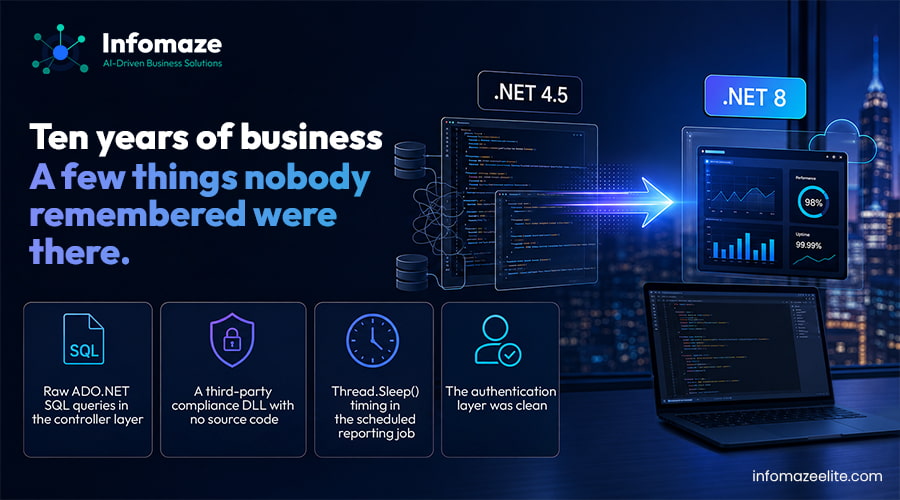
Ten years of business logic. A few things nobody remembered were there.

Before writing a line of .NET 8 code, we spent two weeks on a codebase audit. We don't quote a migration timeline without reading the code first — the audit is where the surprises live, and surprises mid-project are expensive.
📂

Raw ADO.NET SQL queries in the controller layer

The original developers had written raw SQL directly in several controllers rather than through a data access layer. Common for 2013, but it meant the migration to Entity Framework Core required cataloguing every raw query first. We found 34 of them across the codebase.
⚠️

A third-party compliance DLL with no source code

The FCA compliance report generator called a third-party .dll supplied without source, with no .NET Core equivalent, from a vendor that no longer existed. This was the biggest discovery. We had to reverse-engineer what it was doing and rebuild it natively. The compliance team at Meridian validated 50 historical reports against the new output before we went live.
🧵

Thread.Sleep() timing in the scheduled reporting job

The overnight report generation used Thread.Sleep() loops for timing. This pattern doesn't carry into .NET 8's async/await model cleanly. We refactored it to IHostedService with Quartz.NET scheduling — more reliable and properly cancellable.

The authentication layer was clean

ASP.NET Forms Authentication, while legacy, was well-structured. It migrated to ASP.NET Core Identity without significant rework — and became the first module running on .NET 8 in production, at the end of week 4.

—The Migration — Phase by Phase

14 weeks. 300 advisers using the portal every single day throughout.

01
Weeks 1–2 · Audit and Infrastructure
+
Full codebase audit completed. Azure infrastructure provisioned: .NET 8 Azure App Service, SQL Server 2022 alongside the existing SQL Server 2014 (not replacing it yet — same data, new access layer coming), Azure DevOps CI/CD pipeline configured. Nginx routing layer deployed and tested in staging. The legacy IIS server: untouched.
02
Authentication and session layer (Weeks 3–4)
+
First module live on .NET 8. ASP.NET Forms Authentication migrated to ASP.NET Core Identity. JWT replacing the old session cookie model. All 300 advisers logged in through the new authentication without knowing it — same URL, same interface, .NET 8 underneath. Stateless JWT authentication also enabled proper horizontal scaling on Azure App Service, which the old sticky-session model had made impossible
03
Portfolio view and client data layer (Weeks 5–7)
+
The core of the portal. The 34 raw ADO.NET SQL queries catalogued in the audit were migrated to Entity Framework Core 8 with a DbContext structured around the existing schema — no schema changes, same SQL Server data, typed access instead of raw queries. Average portfolio page load time: 4.1 seconds before, 1.4 seconds after. No caching changes, no query rewrites. The .NET 8 runtime and EF Core query batching delivered this improvement on their own.
04
Document storage migration (Weeks 8–9)
+
11 years of client documents — 340GB — moved from an on-premise file share to Azure Blob Storage. The migration ran as a background sync job overnight for 8 nights. During the transition, the read path checked Azure Blob first and fell back to the legacy share. No document was unavailable at any point. The legacy share was retired after the sync confirmed 100% transfer.
05
Compliance reporting module (Weeks 10–12)
+
The most complex module and the most carefully validated. The missing third-party DLL was rebuilt natively using iTextSharp for PDF generation and a clean service class. We worked from the FCA's published report specification and validated our output against 50 historical reports. The compliance team signed off before the module went anywhere near production.
06
Scheduled jobs, final testing, legacy retirement (Weeks 13–14)
+
Overnight report generation refactored from Thread.Sleep() to IHostedService + Quartz.NET. Full end-to-end regression test of every module. Routing layer updated to send all traffic to .NET 8. Legacy IIS server left receiving zero traffic for 72 hours as a standby fallback, then decommissioned.
AreaBeforeAfter (.NET 8)
Runtime.NET Framework 4.5 — EOL, no new featuresNET 8 LTS — active development, modern APIs
DeploymentIIS on-premise Windows Server — manual deployAzure App Service — auto-scaling, CI/CD pipeline
AuthForms Authentication + sticky session stateASP.NET Core Identity + JWT + Azure Redis cache
Data accessRaw ADO.NET SQL in 34 controller methodsEntity Framework Core 8 — typed, testable, clean
File storageOn-premise file share · 340GB · no CDNAzure Blob Storage — geo-redundant, CDN-backed
SchedulingThread.Sleep() timing loops — fragileIHostedService + Quartz.NET — cancellable, reliable
ComplianceThird-party DLL · no source · vendor goneRebuilt natively · FCA spec validated · owned code
Page load4.1s average (portfolio view)1.4s average — 68% improvement
3rd party SDKsMultiple providers dropped .NET Framework supportAll modern financial APIs now accessible
DowntimeDreaded by the business for two yearsZero hours across 14-week migration
— Outcomes

What changed after go-live — in numbers and in practice

68% faster portfolio page loads

4.1 seconds to 1.4 seconds on the portfolio view — the most-used screen in the portal. No caching changes, no query rewrites. The .NET 8 runtime and Entity Framework Core delivered this without extra work. Advisers noticed without being told — the IT team received compliments in the first week.
🔌

Two blocked integrations completed within a month

Two financial data providers Meridian had wanted to integrate with had only published .NET Core SDKs. Both integrations went live within the first month after the migration completed. Work that had been blocked for over two years.
🔒

FCA audit trail unbroken throughout

Not a single gap in the compliance audit trail during the 14-week migration. The compliance module was the last to migrate and the most carefully validated before going live. The FCA audit trail requirement was the hardest constraint on the project — and the one we're most proud of meeting.
👥

The hiring problem solved

Finding contractors willing to work on a .NET 4.5 codebase had become increasingly difficult. After migration, Meridian had access to the full pool of mid-to-senior .NET 8 developers. The talent market for their new stack is an order of magnitude larger.
“We'd been told for two years that migrating without downtime wasn't possible for a system this size. Infomaze did it in 14 weeks. The page load improvement alone justified the project cost.”
— CTO, Meridian Wealth Management

— FAQ

Questions about .NET Framework to .NET 8 migration

How do you migrate a .NET Framework application without downtime?
+
The strangler fig pattern. You place a routing layer in front of the existing application and migrate module by module. The legacy system handles everything until a module is migrated and tested, then the router switches that module's traffic to .NET 8. The legacy application retires gradually — never taken offline as a whole. This is what we used for Meridian. 14 weeks, zero downtime, 300 users throughout.
Do you need to change the database schema when migrating to .NET 8?
+
Not necessarily, and we'd recommend against doing it at the same time as the migration. For Meridian, we kept the same SQL Server schema throughout — we changed the data access layer from raw ADO.NET to Entity Framework Core 8, but the tables stayed the same. Schema improvements are a separate project, better done after the migration is stable and the team has confidence in the new codebase.
How long does a .NET 4.5 to .NET 8 migration take?
+
It depends on codebase size and condition. Meridian's portal — 10 years old, ~300 controllers, one significant unexpected dependency — took 14 weeks. Smaller, cleaner codebases migrate faster. We always start with a paid codebase audit (typically 2 weeks) before committing to a timeline. The audit finds the surprises before the project starts, not during it.
What if a third-party dependency doesn't have a .NET 8 equivalent?
+
It's the most common complication in legacy .NET migrations. The options are: find a .NET 8 equivalent library, use .NET's compatibility shims, or — as we did for the compliance DLL — reverse-engineer and rebuild the functionality natively. We find every dependency in the codebase audit before starting, so there are no surprises mid-project.

Have a .NET Framework application that needs modernising?

We migrate .NET 4.x and .NET Framework applications to .NET 8 — module by module, without downtime, without a big-bang rewrite. ISO 27001. NDA from day one. Start with a free codebase assessment.

Explore .NET Development Services
🔧
Hire .NET Developers
C#, ASP.NET Core, Azure specialists
🏗️
Rescue & Modernise
Legacy systems — zero downtime
🏦
Finance Industry
FCA-compliant portals and fintech
☁️
Cloud Migration
Azure and AWS — proven process
.NET 8 Migration Legacy .NET Modernisation .NET Framework to .NET Core ASP.NET Core Migration C# Modernisation Azure App Service Entity Framework Core Finance Portal Development Hire .NET Developers India Zero Downtime Migration Strangler Fig Pattern FCA Compliance
Back to top
📊 BI Practice
Free Assessment
We find out why your dashboards aren't being used — and fix it.

🔒 ISO 27001 · No spam · Honest assessment