Free AI Readiness Assessment — we map your automation opportunities in 60 minutes, no obligation.
📊 Power BI 🏭 Manufacturing 🇺🇸 United Kingdom
Clients served — 7-Eleven Walmart + Goodwill Network & others

From Excel Reports to a Live
Power BI Dashboard

How a West Midlands manufacturer stopped losing three hours every Monday morning — and found a quality problem hiding in their own data.

POWER BI · EXECUTIVE SUMMARY DASHBOARD
● Live
OVERALL OEE
82%
+4% vs last month
QUALITY REJECTION
2.8%
Rolling 4-week average
OUTPUT vs TARGET
96%
Current week
PRODUCTION PERFORMANCE BY LINE
Line 1 — OEE Performance
84%
Line 2 — OEE Performance
71%
Line 3 — OEE Performance
83%
QUALITY REJECTION TREND
Dimensional Tolerance Failures
▲ 18%
Surface Finish Defects
▲ 4%
Assembly Errors
▼ 6%
📊
MANAGEMENT INSIGHT Dimensional tolerance failures on Product Family B have increased consistently for 4 months. Investigation points to tool wear on Line 2. Estimated annual scrap reduction opportunity: £42,000.
8 wks
Project duration
3yrs
Saved every Monday
4
Live dashboards
3
Data sources connected
— The Problem

Three systems. Three versions of the truth. One broken Monday.

🏭

6 years of growth, same reporting process

When a client like 7-Eleven needed a software upgrade or hardware install across all US stores, work orders had to be created individually. A single national rollout meant thousands of manual entries — each one taking minutes, each one prone to error. With no bulk creation tool, large projects were simply not operationally feasible.

📊

The data existed. The picture didn't.

SAP Business One held production and inventory data. A shared drive held quality tracking sheets. Finance kept a manually updated spreadsheet. Nobody had all three in one view at the same time.

⏱️

Decision speed was the real cost

The Monday 10am management meeting couldn't start properly until the first two hours were spent answering: what are the actual numbers this week? That's two hours of your plant manager, production supervisor, and finance lead sitting in a room reconciling files.


"We're not making bad decisions because we're stupid. We're making slow decisions because we're never looking at the same numbers at the same time."
— Operations Director, Holford Components
— WHAT WE FOUND BEFORE WE STARTED

We told them their data was messy. They didn't love hearing it.

The first thing we do on any data project is spend time with the actual data before agreeing to a scope. In this case, that meant two days on-site in the West Midlands — one day with the production team, one day with finance.

SAP Business One had solid transaction data going back several years. But the way it was being used meant that several key fields were inconsistently populated. Some production orders had completion timestamps. Some didn't. The quality tracking sheet, maintained on a shared drive, had been through three different formats in four years and had columns that meant different things depending on when the row was entered.

We came back with an honest assessment: a clean Power BI dashboard was achievable, but the data quality issues in SAP needed to be addressed first — otherwise we'd be visualising unreliable numbers more attractively. That conversation took some back and forth. Nobody likes being told their data is messy. But they agreed, and the project was better for it.


— WHAT WE BUILT

A staging layer first. Four dashboards second.
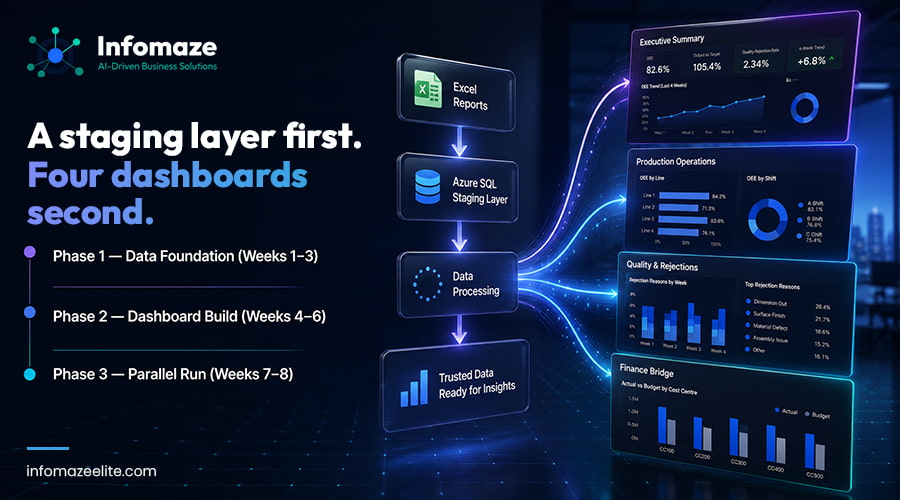
Phase 1 — Data Foundation (Weeks 1–3)

Before opening Power BI, we spent the first three weeks on the data pipeline. We built an Azure SQL staging database that pulled from SAP via the Business One Service Layer API, ingested quality sheet data on a schedule, and replaced the manually maintained Friday finance update with a Power Automate flow.

Phase 2 — Dashboard Build (Weeks 4–6)

Once the pipeline was stable, we built four dashboards:

📈

Executive summary

OEE by production line, output vs target, quality rejection rate, and a rolling 4-week trend. Designed for the Monday management meeting. One screen, no drilling required.
🔧

Production operations

Drill-down by line, by shift, by product. Built for the plant manager who wanted to understand why Line 2 was running at 71% OEE when Lines 1 and 3 were above 80%.

Quality and rejections

Rejection reasons by product, by operator, by week. The dashboard that generated the most conversation — for the first time, the team could see which rejection reasons were growing versus which were stable.
💰

Finance bridge

Actuals vs budget by cost centre, updated daily. Replaced the manually maintained Friday spreadsheet entirely.

Phase 3 — Parallel Run and Handover (Weeks 7–8)

We ran the Power BI dashboards in parallel with the existing Excel process for two weeks. Every Monday the team used both and flagged any discrepancies. By the end of week 8, the management team was confident enough to run the Monday meeting from the dashboard alone.

We spent a full day on-site for handover — training the plant manager and SAP administrator on how to modify reports, refresh data manually if the scheduled refresh failed, and add new product types to the tracking.


— WHAT CHANGED

The Monday meeting went from 90 minutes to 35 minutes.

Not because people were rushing — because the questions that used to take the first hour were already answered before anyone sat down.

The quality dashboard surfaced something the team hadn't seen clearly before: a specific rejection reason — dimensional tolerance failures on a particular product family — had been increasing consistently month on month. It had been in the data all along, buried across different weekly sheets. Visible in a single chart, it was actionable. The production team traced it to a tool wear pattern on Line 2 and corrected it within three weeks of the dashboard going live.

“The quality issue had been in our data for eight months. We just couldn't see it. The first time I looked at the rejection trend chart I thought — how did we miss this?”
— Plant Manager, Holford Components
— TECHNICAL DEEP DIVE

How the data pipeline connected three systems without touching the ERP.

01
SAP Business One → Azure SQL (via Service Layer API)
+
SAP Business One exposes a REST-based Service Layer API. We used this to pull production orders, goods receipts, and job completions on a 2-hour schedule into a staging schema in Azure SQL. The transformation layer here handled the inconsistent timestamp data we'd found in discovery — null completion timestamps were flagged and tracked separately rather than silently dropped.
02
Quality tracking sheet → Azure SQL (via Power Automate)
+
The quality sheet lived on a shared OneDrive drive and was updated by the shop floor team daily. A Power Automate flow monitored for file changes, extracted the new rows, ran a basic validation check (column count, date format, rejection code lookup), and appended clean rows to the staging table. Invalid rows went to a separate review table where the quality manager could correct and resubmit.
03
Finance spreadsheet → Azure SQL (automated Friday close)
+
The finance team's Friday update was the most manual part of the old process. A Power Automate flow now triggers at 5:30pm on Fridays, reads the Excel file from SharePoint, validates the structure against a known schema, and writes the period close figures to the staging database. The manual step is gone. If the file hasn't been updated by 5:30pm, the flow sends an alert to the finance lead.
04
Azure SQL → Power BI (scheduled refresh)
+
Power BI connects to Azure SQL via a published dataset with a 2-hour refresh schedule during business hours. Role-based row-level security means the executive dashboard and the production operations dashboard share the same dataset but each user sees only the data relevant to their role. A senior manager sees the full business. A line supervisor sees their line.

Need a Power BI dashboard that connects your ERP, CRM, and finance data?

We've connected Power BI to SAP, Odoo, QuickBooks, Zoho CRM, and custom backends. ISO 27001. NDA from day one. Fixed-price scoping call — no obligation.

Power BI Service
📊
Power BI Services
Dashboards, ERP integration, BI consulting
🏭
Manufacturing
Software built for production and logistics
🗄️
Data Warehouse & ETL
Single source of truth from all your systems
Back to top
📊 BI Practice
Free Assessment
We find out why your dashboards aren't being used — and fix it.

🔒 ISO 27001 · No spam · Honest assessment