This is where many businesses reach a turning point. Spreadsheets become harder to maintain. Follow-ups get missed. Reporting takes longer. Customer information becomes scattered across emails, files, and different applications.
At this stage, business leaders frequently begin exploring automation. One of the most common questions they ask is:
"What actually changes after implementing Zoho CRM?"
The answer goes beyond software features and dashboards. Business automation isn't simply about replacing manual tasks. It's about creating consistent processes, improving visibility, reducing inefficiencies, and enabling teams to focus on high-value activities.
To understand the impact, it's helpful to look at what businesses often experience before and after implementing Zoho CRM.
Understanding Business Automation
Business automation refers to the use of technology to streamline repetitive tasks, workflows, approvals, communications, and operational processes.
Instead of relying on manual effort for every action, automation enables systems to perform routine activities automatically based on predefined rules. Examples include:
- Assigning leads automatically
- Sending follow-up reminders
- Routing approvals
- Generating reports
- Updating records
- Triggering notifications
The objective isn't to replace people. The objective is to eliminate repetitive work so employees can focus on activities that require human expertise, creativity, and relationship building.
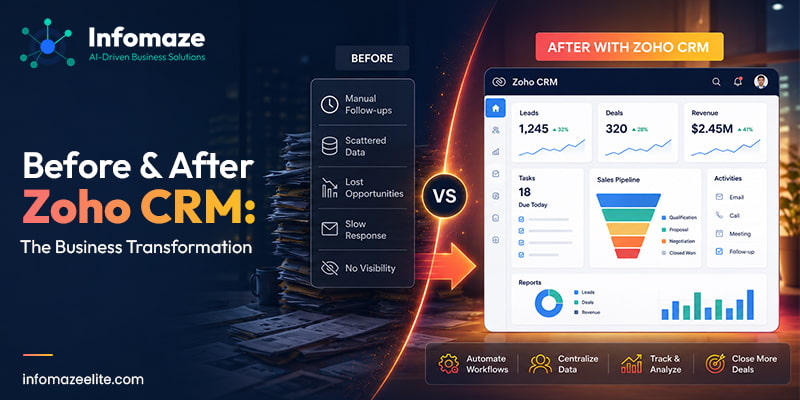
Before Zoho CRM: Common Business Challenges
Many growing businesses share similar operational challenges before implementing CRM automation.
Customer Information Is Scattered
Customer details often exist in multiple locations:
When information is spread across different systems, finding accurate data becomes difficult. Employees spend unnecessary time searching for information instead of serving customers.
Follow-Ups Depend on Memory
Sales and customer service teams frequently manage dozens or even hundreds of interactions simultaneously. Without automation:
Missed follow-ups often result in lost opportunities and inconsistent customer experiences.
Reporting Requires Manual Effort
Many organizations still generate reports manually. Employees gather data from multiple sources, combine information, and create reports in spreadsheets. The result is:
Leads Are Not Prioritized Effectively
Without a structured process, incoming enquiries may not receive equal attention. Some leads receive immediate responses. Others wait hours or days. Response times can significantly impact conversion rates.
Teams Operate in Silos
Marketing, sales, and customer service departments often use different systems and processes. This creates communication gaps and reduces organizational visibility.
What Changes After Zoho CRM Implementation?
The transformation is rarely dramatic overnight. Instead, businesses begin experiencing improvements across multiple areas of operation.
Centralized Customer Information
One of the first benefits businesses notice is improved organization. Customer information becomes available in a single location. Teams can access:
Instead of searching across multiple systems, employees can quickly access relevant information when needed.
Automated Lead Management
Lead management becomes significantly more structured. Rather than manually assigning opportunities, Zoho CRM can automate the process using predefined rules. For example:
This helps ensure consistency and improves response times.
Consistent Follow-Up Processes
One of the biggest advantages of CRM automation is consistency. Instead of relying on memory, businesses can create automated workflows that:
As a result, opportunities are less likely to be overlooked.
Improved Team Collaboration
Collaboration becomes easier when everyone works within the same system. Sales representatives, managers, and customer service teams gain visibility into customer interactions. This reduces confusion and creates a more connected customer experience.
Better Visibility for Decision-Makers
Leaders gain access to real-time information rather than waiting for manually prepared reports. Dashboards can provide visibility into:
This enables faster and more informed decision-making.
Before and After: A Practical Example
Consider a growing service-based business receiving enquiries through:
- Website forms
- Referrals
- Social media
The process might look like this:
Common challenges include:
The process becomes more streamlined:
The difference isn't simply speed. It's consistency, visibility, and accountability.
Areas where businesses commonly automate first
Most organizations don't automate everything at once. They typically begin with high-impact processes.
Lead Assignment
Automatically directing enquiries to the appropriate employee or department.
Follow-Up Reminders
Ensuring every opportunity receives timely attention.
Sales Pipeline Management
Tracking deal progression without manual updates.
Approval Processes
Automating approvals for quotations, discounts, or internal requests.
Customer Communications
Triggering emails and notifications based on predefined actions.
Reporting
Generating dashboards and reports automatically.
The Impact on Customer Experience
Automation isn't only beneficial for internal teams. Customers benefit as well.
Customers appreciate timely communication. Automated workflows help ensure enquiries are acknowledged quickly.
Processes become standardized. Customers receive a more predictable and professional experience.
When employees spend less time on administrative tasks, they can dedicate more attention to customer needs.
Common Misconceptions About Business Automation
One of the most common misconceptions is that automation eliminates jobs. In reality, automation typically removes repetitive work rather than replacing strategic responsibilities.
Employees can focus on:
Many small and mid-sized businesses benefit significantly from automation. Growth often creates operational challenges regardless of company size.
Modern CRM platforms offer flexible configuration options that allow businesses to automate gradually and strategically.
Signs Your Business May Be Ready for Automation
Consider evaluating automation opportunities if:
- Teams rely heavily on spreadsheets.
- Customer information exists in multiple locations.
- Follow-ups are inconsistent.
- Reporting consumes significant time.
- Growth is creating operational strain.
- Managers lack visibility into performance.
These indicators often suggest that manual processes are becoming barriers to growth.
Building an Automation Strategy
Successful automation begins with process evaluation. Businesses should identify:
- Repetitive tasks
- Approval bottlenecks
- Communication gaps
- Reporting challenges
From there, automation can be implemented strategically rather than attempting to automate everything simultaneously.
The most successful CRM projects focus on solving real business challenges rather than simply deploying technology.
Frequently Asked Questions
Final Thoughts
Business automation is often misunderstood as a technology initiative. In reality, it is a business improvement initiative. The goal isn't simply to automate tasks. The goal is to create processes that support growth, improve visibility, reduce inefficiencies, and enhance customer experiences.
Before automation, many businesses spend significant time managing information, tracking activities, and coordinating workflows manually.
After implementing a structured CRM solution such as Zoho CRM, organizations often gain greater consistency, transparency, and operational efficiency. The result is not just a more organized business. It's a business that is better equipped to scale.
Businesses considering automation should begin by evaluating their current processes and identifying areas where manual work creates delays or inefficiencies. Working with an experienced Zoho implementation partner can help uncover automation opportunities and create a roadmap that supports sustainable growth.