Progressive Web App vs. Native Web Application
These two terms get used loosely, and that loose usage is exactly why businesses end up choosing the wrong one. A progressive web app and a traditional web application aren't different tiers of quality — they're built to solve different problems. Here's a factor-by-factor comparison to help you figure out which one actually fits what you're building.
Before comparing anything, it's worth being precise about what each term actually means, since the confusion usually starts here. A progressive web app (PWA) is a web application built with a specific set of technologies — a service worker, a web app manifest, and HTTPS — that together let it behave more like a native app: it can be installed to a device's home screen, work offline or on a poor connection, and send push notifications, all while still being, technically, a website.
A traditional web application — sometimes called a native web application in the sense that it runs natively in the browser without the PWA layer — is everything else: a fully custom web application, portal, or SaaS platform that runs in a browser tab, requires an internet connection, and doesn't install to a device. Most business software built today, including most of what we build as custom web application development, falls into this category by default, with the option to add PWA capabilities on top when it makes sense.
The question isn't which one is "better." It's which set of tradeoffs fits what your application actually needs to do.
The 5 Factors That Matter Most When Choosing Between a PWA and a Traditional Web Application
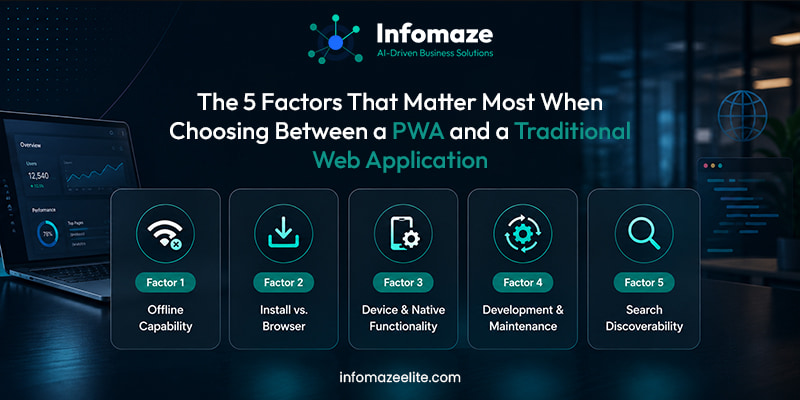
Does your application need to work without a reliable connection?
This is usually the single clearest deciding factor. A PWA can cache assets and data locally, letting users continue interacting with parts of the application even when their connection drops, then sync once they're back online. A traditional web application generally assumes an active connection and simply won't function without one.
Your users are field workers, delivery staff, or anyone operating in areas with unreliable connectivity, where the application needs to remain usable offline.
Your users are consistently on a stable connection — office staff, desk-based teams, or customers browsing from home — where offline support adds complexity without real benefit.
Map where and how your users will actually access the application. If "no signal" is a realistic, recurring scenario for your users, PWA capability isn't a nice-to-have — it's close to a requirement.
Do users need to install it, or is a browser tab good enough?
A PWA can be installed to a phone or desktop home screen and opened like any other app, without going through an app store. A traditional web application lives in a browser tab or bookmark — perfectly normal for software people use occasionally, but a real point of friction for something people are meant to open multiple times a day.
PWA fits when
The application is meant to be a daily-use tool, and reducing friction to open it — an icon on the home screen instead of a remembered URL — meaningfully improves adoption.
Traditional web app fits when
Users access it occasionally, through a bookmarked link, an email, or a portal login, where installability adds little practical value.
What actually determines it
Estimate how often the average user opens this application. Daily or near-daily use strongly favors PWA installability; occasional or task-based use usually doesn't need it.
How much device hardware or native functionality do you need?
PWAs have expanded significantly in what they can access — camera, GPS, push notifications, and more — but a fully native mobile app still has deeper, more reliable access to certain device capabilities, background processing, and platform-specific features. A traditional web application, by comparison, is generally simpler and doesn't attempt this kind of device integration at all.
PWA fits when
You need moderate device access — camera for photo upload, location for basic geo features, push notifications — without the overhead of native app store development.
Traditional web app fits when
The application doesn't need device hardware access at all — most business dashboards, portals, and internal tools fall squarely here.
What actually determines it
List the specific device features your application genuinely needs. If the list is short and common — camera, location, notifications — a PWA likely covers it. If it's longer or requires deep, reliable hardware integration, that's a conversation about native mobile development, not a web application decision at all.
Not sure whether your project needs PWA capability?
Tell us what you're building and who's using it. We'll give you an honest read on whether a progressive web app, a traditional custom web application, or a native mobile app actually fits — no pressure toward the more complex option.
Talk to Our Web Application Team →How much ongoing development and maintenance can you realistically support?
A PWA still shares the same core codebase as a traditional web application — it's not a separate platform to maintain the way a native iOS or Android app would be. But adding a service worker, offline data sync, and installability does introduce real complexity: caching strategy, sync conflict handling, and update behavior all need to be designed and tested properly, or the offline experience becomes more confusing than helpful.
PWA fits when
The offline and installability benefits are valuable enough to justify the added complexity, and there's a plan to test and maintain that layer properly over time.
Traditional web app fits when
Simplicity itself is valuable — fewer moving parts, easier debugging, and a more straightforward path for a smaller team to maintain long-term.
Be honest about your team's — or your partner's — capacity to properly build and test offline behavior. A poorly implemented PWA that shows stale or conflicting data is worse for user trust than a straightforward traditional web application that simply requires a connection.
Does discoverability through search matter for this application?
A traditional web application can be crawlable and indexable by search engines when built and configured for SEO. — genuinely useful if part of your application's growth depends on people finding it through search. A PWA remains a website too and retains this same searchability, which is one of its real advantages over a native mobile app, but the emphasis on installability means some PWAs are designed to prioritize the installed, app-like experience over the discoverable, browsable one.
PWA fits when
You want both — search discoverability for new users, and an installed, app-like experience for returning ones — which a well-built PWA can genuinely offer.
Traditional web app fits when
Discoverability through search or shared links is the primary way users will find and access the application, with less emphasis on repeat, installed use.
What actually determines it
Think about how new users will actually find this application. If search or shared links matter, make sure whichever approach you choose is built with that discoverability preserved — it's achievable with either, but worth confirming explicitly during planning.
"A PWA isn't a fancier website. It's a website that's decided to also behave like an app, for the specific users who need that. Everyone else is usually better served keeping it simple."
The honest answer to "should we just build a native mobile app instead?"
This comes up in almost every conversation about PWAs, and it's a fair question — if installability and offline access matter, why not go straight to native iOS and Android development? The honest answer is that native apps still offer the deepest, most reliable access to device hardware and platform-specific features, and if your application genuinely depends on that, native is the right call regardless of what a PWA can now do.
But for a large share of business applications — customer portals, field service tools, internal operations dashboards — the gap has narrowed enough that a well-built PWA delivers the practical benefits people actually want (installability, offline access, push notifications) without the cost, maintenance burden, and app store approval process of maintaining separate iOS and Android codebases. The right question isn't "PWA or native app," in the abstract — it's whether your specific application needs native-only capabilities badly enough to justify that additional overhead.
A traditional web application can often be upgraded into a PWA later, if it was built with reasonably clean architecture to begin with. This means a business doesn't have to get this decision perfectly right on day one — starting with a solid traditional web application and adding PWA capability once there's real evidence users need offline access or installability is a genuinely sound approach, not a compromise.
What choosing correctly actually looks like
After working through these factors properly, most businesses land on one of two clear outcomes. Either the offline access and installability genuinely matter — field teams, unreliable connectivity, daily habitual use — and a progressive web app is worth the added engineering care it requires. Or those factors don't apply strongly, and a traditional custom web application delivers everything the business actually needs with less complexity to build, test, and maintain.
Neither outcome is the "advanced" choice and neither is the "basic" one — they're two legitimate approaches to custom web application development, and the right answer depends entirely on how and where your specific users will actually use the application.