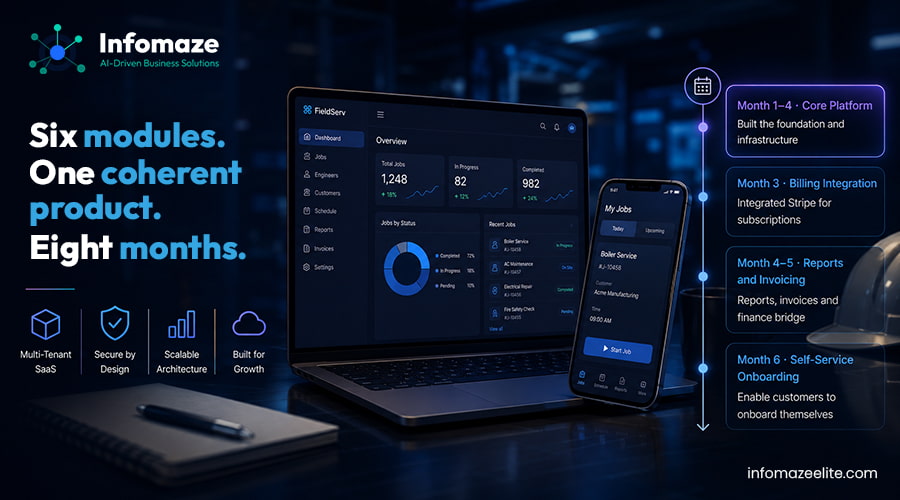
How a former plumber turned founder went from a spreadsheet-managed pilot to a live product with 14 paying customers — in eight months.
Client managed his own heating and plumbing business in Bristol using WhatsApp, a shared Google Calendar, and a spreadsheet. Every other small field service business owner he knew was doing the same thing. The enterprise platforms — ServiceMax, Simpro, FieldAware — were too expensive and too complicated for businesses with 5 to 20 engineers. Nobody had built something that felt like it was designed for a business owner rather than an enterprise IT department.
He came to us with a detailed product spec, a clear target customer, and a realistic budget. Two UK agencies had already quoted timelines that would have burned through his runway before launch. A third had started the project, billed for three months, and delivered a prototype that didn't match what had been discussed.
We scoped the project together over three calls and agreed on a phased approach: get to a launchable product with his first 10 customers as the milestone, then build from there.
The architecture question that drives every SaaS build: how do you store data from multiple customers in a way that's secure, performant, and maintainable as the product grows?
Simplest to build. Biggest risk: one missed WHERE clause in a query returns another customer's data. Fine for simple products. Not right for a platform managing operational data for field service businesses.
Each customer gets their own PostgreSQL schema for operational data — jobs, engineers, clients, invoices. The central database handles accounts, billing, and authentication. Proper data isolation without the operational weight of separate databases.
Maximum isolation. Operationally heavy — every new customer means a new database, every migration runs N times. Right for very high-value enterprise customers. Too heavy for a startup targeting SMEs.
We went with Option 2 — central database for account management and billing, separate PostgreSQL schemas for all operational data. We used stancl/tenancy for the Laravel implementation, customised to handle the scheduled job dispatch system's edge cases.
The first thing we do on any data project is spend time with the actual data before agreeing to a scope. In this case, that meant two days on-site in the West Midlands — one day with the production team, one day with finance.
SAP Business One had solid transaction data going back several years. But the way it was being used meant that several key fields were inconsistently populated. Some production orders had completion timestamps. Some didn't. The quality tracking sheet, maintained on a shared drive, had been through three different formats in four years and had columns that meant different things depending on when the row was entered.
We came back with an honest assessment: a clean Power BI dashboard was achievable, but the data quality issues in SAP needed to be addressed first — otherwise we'd be visualising unreliable numbers more attractively. That conversation took some back and forth. Nobody likes being told their data is messy. But they agreed, and the project was better for it.
The job management system was the heart of the product. A dispatcher creates a job in the web interface, assigns it to an engineer, and the engineer receives it on their phone. The engineer logs arrival, completes the job report — photos, completion notes, customer signature — and the job status updates live on the office dashboard via Pusher WebSocket connections.
The client had originally wanted native apps. The budget and the 8-month timeline made that difficult for v1. The case for a PWA: engineers access it from their phone's browser, it can be added to the home screen, it works offline for job forms and syncs when connectivity returns, and it behaves correctly on both iOS and Android without two codebases to maintain. We recommended testing it with the first 10 customers before deciding whether native apps were worth the investment. Every one of the 14 launch customers had engineers using the PWA without reported issues.
Three subscription plans, managed through Stripe. The billing system handles plan changes, failed payment retries, and automatic account suspension after a grace period. Stripe's webhook handling was the most time-consuming part — testing every failure scenario, ensuring the platform stayed in sync with Stripe's state even when webhooks arrived out of order or were delayed.
Client had been onboarding customers manually over video calls. As the number grew, that wasn't scalable. We built a self-service flow: account creation, company setup, adding engineers, configuring job types, and a test job walkthrough. New customers can be fully operational without involving client or his team.
The client launched to his waitlist in month 8. Fourteen paying customers within the first month — all of them had moved from Simpro or a similar platform that felt too complicated for a business of their size. The feedback client consistently heard: it felt like it was built by someone who understood how a small field service business works. Which, of course, it had been.
One customer — a solar panel installation company in Cardiff — had engineers working in locations with poor signal. The offline sync feature meant they could complete job reports in a basement or a loft and have everything upload when they were back in the van. Client hadn't explicitly asked for offline sync in the scope. We'd included it because we knew field service engineers work in awkward environments.
We continue working with client on a monthly retainer. Six months post-launch: a customer portal — read-only view for end customers to see job history, download past reports, and raise service requests — is live. Xero two-way invoice sync is live. A third-party integrations API is in scoping, which will allow larger field service businesses to connect the platform to their existing systems.
The native app question came up at month 3 of live operation. The PWA had performed well enough that client chose to stay with it for v1 and revisit native apps when he reaches 100 customers and has a clearer picture of exactly where the PWA falls short.