AI Automation for Business: Where Should You Actually Start?
AI automation does not have to begin with an AI agent or a major technology project. The better starting point is to identify repetitive work, duplicated data entry, slow hand-offs and decisions that consume employee time. This guide explains how to find the right automation opportunities, when AI is actually useful, and where traditional automation may be the better choice.
What should you actually automate?
At Infomaze, we don't think businesses should start with AI. We think they should start with the business process. Before anyone decides whether a job needs an AI agent, a large language model, OCR, an API integration or a simple workflow tool, someone has to first understand where the team's time is going, where information is being entered repeatedly, where mistakes happen, and where customers or employees end up waiting unnecessarily. That's where useful automation actually begins.
Automation isn't automatically an AI problem
A lot of what businesses call "automation" doesn't need AI at all. Sometimes the right fix is much simpler — and cheaper to build and maintain, because there's nothing that needs to "get smarter" over time.
Connect a website form to your CRM automatically.
Automatically create an invoice when the required trigger occurs.
Move data between connected business systems.
Send reminders when an activity passes its due date.
Update inventory automatically when an order is processed.
Route an enquiry to the appropriate salesperson based on predefined rules.
Synchronising a CRM with accounting software falls in the same bucket. These are traditional automations, and they're usually handled well through APIs, webhooks, workflow engines, Make.com, n8n or custom integrations — no AI required.
AI becomes useful once a process involves unstructured information, interpretation, classification or decision support — something a fixed rule can't fully capture. A basic rule can create a task the moment an email arrives. AI is what lets the system actually read that email, work out what the customer wants, identify who they are, classify the request, pull out the important details, update the CRM, assign the right person, and draft a response — a much deeper layer on top of ordinary automation.
Does This Process Need AI?
Not every automation problem needs AI. Start by understanding what the process actually needs to do.
Use traditional automation when:
- The rules are fixed and predictable
- Data is already structured
- One system simply needs to update another
- The same action happens after the same trigger
Consider AI when:
- Emails or documents must be understood
- Information is unstructured
- Requests need classification or interpretation
- The system has to extract meaning before acting
- A recommendation or judgement is required
Where should a business look for automation opportunities?
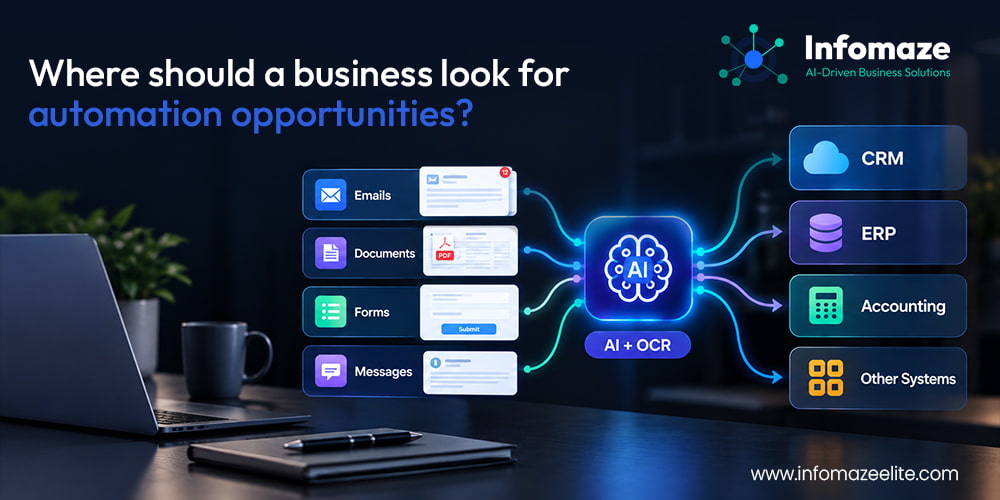
One of the simplest ways to find automation worth building isn't a workshop about AI capabilities — it's a plain question to your own team: where are we entering the same information more than once? Perhaps information arrives through a website form and someone manually retypes it into the CRM. Or an order gets logged in the CRM and later re-entered into an ERP or accounting system by hand. Every one of those double-entry points is a strong candidate.
The next question is which emails employees are repeatedly reading and processing. In most businesses, that list looks familiar:
- Sales enquiries
- RFQs
- Customer support requests
- Purchase orders
- Supplier messages
- Job requests
- Applications
- Claims
- Appointment requests
AI can increasingly read these messages, classify them, extract the relevant information, and initiate the correct business process without someone doing that translation by hand.
The same logic applies to documents. Ask what your people are manually reading through in a typical week — invoices, purchase orders, forms, contracts, PDFs, statements, reports, applications, certificates. Using OCR and AI together, information from documents like these can usually be extracted, validated and transferred automatically into the appropriate business system.
From manual process to AI-powered workflow
Take accounts payable — a process almost every business runs the same tedious way.
Traditional manual process
- Open the invoice email
- Download the invoice
- Read the invoice
- Find the supplier
- Enter the invoice into the accounting system
- Locate the purchase order
- Compare the amounts
- Request approval
- Record the result
AI-powered process
- Invoice received
- OCR reads the document
- AI extracts the information
- Supplier identified
- Purchase order located
- Amounts compared
- Exceptions highlighted
- Human approves
- Accounting system updated
The objective isn't necessarily to remove people from the process completely. It's to remove the repetitive work, so employees can concentrate on the exceptions and the decisions that actually need a person.
"Good automation isn't about removing people. It's about putting human attention where it adds the most value."
Human-in-the-loop: not everything should be fully automated
One common misconception about AI automation is that every process should run without any human involvement. We don't believe that. For plenty of workflows, the more dependable pattern is:
Quotation preparation is a good example. AI may be able to read the customer request, identify the products or services involved, find previous quotations, prepare descriptions, recommend pricing, and highlight anything missing — but the final quotation going out to a customer may still need a sign-off from an experienced salesperson. The same principle holds for:
- Payments
- Credit approvals
- Contracts
- Hiring
- Pricing
- Financial decisions and sensitive customer communications
AI can add intelligence to your existing CRM and ERP
Businesses often ask whether they need to replace their existing software to benefit from AI. Usually, the answer is no. AI can sit around and between the systems you already use:
Your existing CRM or ERP can remain the system of record. AI just makes that system more intelligent — reading what comes in, and updating what's already there.
Already using a CRM, ERP or accounting platform?
You may not need to replace it. We can review where AI or workflow automation can be added around your existing systems.
Examples of AI automation opportunities
Sales & CRM
A new enquiry arrives from the website. AI can:
Salespeople spend less time researching and entering information, and more time actually speaking with prospects.
Customer service
Instead of a generic chatbot, an AI assistant can use your own documentation, product information and historical knowledge to answer questions — using RAG and controlled knowledge sources, so answers come from your business's actual information, not a guess. Complex requests escalate to a human automatically.
Quotes & RFQs
A customer emails: "Can you quote 5,000 brochures, A4 folded to A5, full colour, delivered next Friday?" AI can extract:
- Quantity
- Size
- Product
- Printing specifications
- Delivery requirement
It can then start the quotation workflow and flag anything that's missing.
Field service
A customer reports an issue. AI could:
Accounting
Documents such as invoices and purchase orders can be automatically read and matched. Exceptions get presented to finance staff — instead of requiring them to manually check every single document that comes through.
Management reporting
Instead of managers opening several dashboards every morning, AI can prepare a single summary, such as:
- Sales dropped 8% yesterday
- Three large quotations remain unapproved
- Five customers have overdue payments
- Support response times increased
- Inventory for two high-volume items is below expected demand
The manager can then focus immediately on what actually needs attention.
AI agents: the next stage of automation
Traditional automation follows predefined rules — if X happens, perform Y. AI agents work differently: given a goal, they can potentially work through multiple steps to reach it. Take an example: "Follow up all open quotations that have had no customer response for seven days." An AI agent could potentially:
Identify eligible quotations
Review the quotation
Review previous customer communication
Draft an appropriate follow-up
Determine the preferred communication channel
Send or request approval
Update the CRM
Create the next follow-up activity
Escalate important opportunities to a salesperson
Agents can be powerful, but they should still operate within clearly defined business rules, permissions and approval limits. Autonomy without boundaries is where automation projects tend to go wrong.
How do you decide what to automate first?
Don't automate something simply because it can be automated. Look at the business impact. We generally recommend examining four factors for each candidate process:
Volume — how many times does this activity happen each week or month?
Time — how much employee time is spent performing it?
Error rate — how often do mistakes happen because the work is manual?
Business impact — does improving the process affect revenue, customer experience, employee productivity, costs, response time or compliance?
A process that takes only five minutes may look insignificant on its own. But if twenty employees perform it twenty times every day, the impact adds up fast.
Measure automation in business terms
The objective shouldn't be "we implemented AI." It should sound more like one of these:
- "We saved 120 staff hours every month."
- "Customer enquiries are now responded to in five minutes instead of three hours."
- "Our team can process twice as many invoices without adding another employee."
- "Our salespeople spend more time selling because lead research and CRM updates are automated."
Useful automation should eventually translate into outcomes like these — measurable, and stated in business terms rather than technology terms.
The Infomaze AI automation approach
We've been building business applications, CRM systems, ERP solutions and integrations for more than two decades. Our approach to AI automation follows the same principle we've applied to business software all along: understand the business before designing the technology.
Discover
Understand the existing process, people, systems and problems.
Measure
Determine where time, cost, errors and delays actually occur.
Prioritize
Identify the automation opportunities with the strongest potential business value.
Automate
Choose the appropriate technology — APIs, Make.com, n8n, workflow automation, OCR, LLMs, RAG, AI assistants, AI agents, or custom applications.
Integrate
Connect the automation with your existing CRM, ERP, accounting software and other systems.
Validate
Test results, handle exceptions, and introduce human approvals wherever required.
Improve
Measure the outcome and continuously improve the process.
Download our AI automation white paper
From Manual Work to AI-Powered Operations: How to Audit Your Business Processes and Identify the Right Automation Opportunities
A detailed, practical guide covering:
- How to identify automation opportunities
- Traditional automation vs AI automation
- Where LLMs and AI agents add value
- Human-in-the-loop automation
- CRM and ERP integration
- Document and email automation
- RAG and business knowledge
- AI automation maturity levels
- Measuring ROI
- How to conduct an AI Automation Audit